Facebook Lookalike Audiences launched in 2013, and for most of the decade that followed, they were the default prospecting tool on Meta. Upload a customer list, pick a percentage, and the algorithm would find new users who looked like your best buyers. That basic mechanic still works. But the way lookalikes function inside the ad platform shifted after Meta’s Andromeda retrieval system rolled out across most objectives by October 2025. Under Andromeda, creative assets act as targeting signals alongside audience definitions, which means lookalikes no longer work as hard audience boundaries. They operate more like signal seeds that give the algorithm a starting point.
For media buyers, DTC brands, and agency teams running paid social, this changes the math. Building and optimizing lookalikes still works the same way. The strategic context around them has shifted far enough that the fundamentals and the newer trade-offs are worth revisiting.
Key Takeaways
A Facebook Lookalike Audience finds new users who share behavioral and demographic traits with an advertiser's existing customers, using a Custom Audience as the source seed.
The similarity percentage (1% to 10%) controls the trade-off between precision and reach. A 1% lookalike targets the closest behavioral match within a country; 10% casts the widest net with progressively weaker similarity.
CRM purchase lists carry the strongest signal for building lookalikes because they are first-party data from confirmed buyers and are not affected by iOS ATT tracking restrictions.
Value-based lookalikes weight the source audience by customer lifetime value, so Meta's algorithm prioritizes finding users who resemble an advertiser's highest-spending customers rather than the average buyer.
Meta Andromeda treats creative assets as targeting signals alongside audience definitions, which means lookalikes now function as signal seeds rather than hard audience boundaries.
Lookalike audiences, broad targeting, and Advantage+ Audience each trade advertiser control for algorithmic freedom differently. A structured test with the same creative and budget across all three is the most reliable way to choose.
In a full-funnel strategy, retargeting covers warm bottom-of-funnel users, lookalikes handle mid-funnel prospecting, and broad or Advantage+ Audience picks up cold top-of-funnel traffic.
The lookalike refreshes automatically every 3 to 7 days, but it draws from the source Custom Audience. An outdated source list produces an outdated lookalike.
What is a Facebook Lookalike Audience?
A Facebook Lookalike Audience is a targeting option in Meta Ads Manager that finds new users who share behavioral and demographic characteristics with an advertiser’s existing customer base. The advertiser supplies a source audience, typically a Custom Audience built from CRM data, pixel events, or on-platform engagement, and Meta’s machine-learning system analyzes signals including demographics, interests, purchase history, device type, and browsing behavior to identify statistically similar people who have not yet interacted with the brand.
The key distinction from a Custom Audience is directional: a Custom Audience targets people an advertiser already knows (website visitors, email subscribers, past buyers), while a Lookalike Audience uses that known group as a template to find net-new prospects. Source audience members are automatically excluded from the resulting lookalike, which means all ad spend goes toward acquisition. The audience refreshes every 3 to 7 days as Meta updates its user data without any manual intervention. Meta requires a minimum of 100 source users from the same country to build a lookalike, though the official recommendation is 1,000 to 5,000 source users for the algorithm to identify meaningful behavioral patterns.
How the similarity percentage works (1% to 10%)
When building a Lookalike Audience, advertisers choose a similarity percentage between 1% and 10%. A 1% setting pulls the smallest, closest-matching audience within a given country. At 10%, the net is much wider, with progressively weaker similarity to the source. Because the percentage is country-specific, a 1% lookalike in the United States represents a much larger raw audience than a 1% lookalike in Belgium.
In one of the most widely cited experiments on this topic, AdEspresso (2017) tested a 1% lookalike against a 10% lookalike and found roughly 70% lower cost per acquisition for the 1% audience. The study predates Meta’s Andromeda system and is now nearly a decade old, which means the algorithm’s behavior at each percentage tier may have shifted since then. Still, the directional finding appears consistently across 2025 and 2026 sources.
As a practical starting point: 1% lookalikes tend to perform best for conversion-focused campaigns where cost per result matters most. A 3% to 5% range balances reach and relevance for mid-funnel objectives. Audiences in the 5% to 10% range work better for awareness campaigns and top-of-funnel prospecting where scale outweighs per-user precision.
Source audiences: what makes a good seed
Source audience quality is the single biggest factor in lookalike performance. Every Lookalike Audience starts from a Custom Audience, and the strength of that seed determines how well Meta’s algorithm can find similar users. Meta requires a minimum of 100 users from the same country, with 1,000 to 5,000 recommended for stronger pattern matching.
Not all source audiences carry the same signal strength, and the gap between the best and worst seed type can swing CPA by double digits.
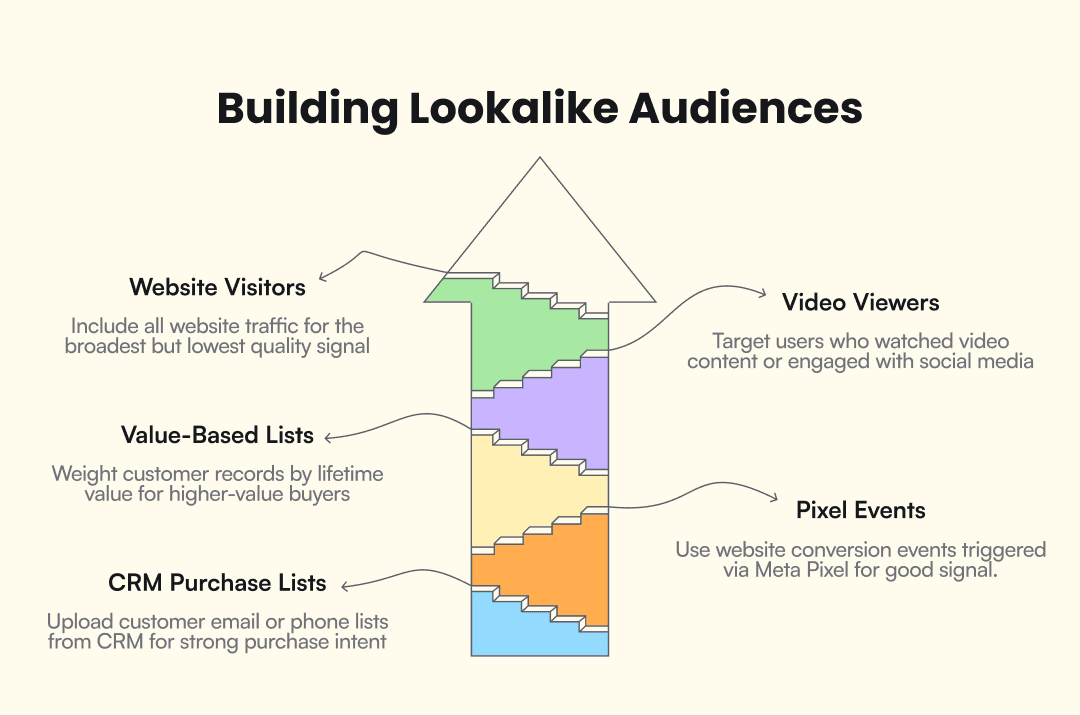
CRM purchase lists carry the strongest signal because the data comes from confirmed buyers. Upload customer emails or phone numbers directly from your CRM. Since these are first-party data, they bypass privacy-related signal loss entirely.
Pixel purchase or conversion events rank second. These are users who triggered a specific conversion event on your website via Meta Pixel. The signal is strong, but data volume and accuracy have declined since Apple’s ATT rollout in 2021.
Value-based lists with LTV weighting are a variant of CRM lists where each customer record includes a lifetime value score. Meta uses that data to skew its search toward users who resemble your highest-spending buyers, giving more weight to the top of your customer base.
Video viewers and engagement audiences include people who watched your video content or engaged with your Facebook or Instagram page. This is on-platform data, unaffected by iOS tracking restrictions.
Website visitors (all traffic) cast the broadest net but produce the weakest signal, because the pool includes everyone who landed on any page regardless of intent.
A typical CSV customer list matches 50% to 70% of uploaded records to Meta profiles. The remaining records are lost to email mismatches, inactive accounts, or privacy restrictions.
Value-based lookalikes
Value-based lookalikes weight the source audience by customer lifetime value, so Meta’s algorithm prioritizes finding users who resemble an advertiser’s highest-spending customers rather than any buyer in the list. The setup is straightforward: include a value or LTV column alongside email addresses in the customer list upload, and Meta uses that data to skew the lookalike toward higher-value profiles.
This works best for e-commerce businesses with wide variation in order values, subscription companies with enough LTV data to differentiate tiers, and any advertiser whose revenue per customer varies enough that treating all buyers equally leaves money on the table. If your top 20% of customers drive 60% of revenue, a value-based lookalike uses that 20% as the template rather than blending them with one-time buyers.
The privacy factor: iOS 14.5 and source quality
Apple’s App Tracking Transparency framework, introduced with iOS 14.5 in April 2021, reduced the volume and accuracy of data flowing from apps and websites to Meta. Pixel-based conversion events and app events took the biggest hit, because ATT gave users the option to block cross-app tracking, and the majority opted out.
Not all source types were equally affected. CRM customer lists are first-party data and bypass ATT entirely. On-platform engagement audiences, including video viewers, page engagers, and Instagram interactors, live inside Meta’s ecosystem and never relied on cross-app tracking in the first place. Both categories are effectively privacy-resistant sources for building lookalikes.
For advertisers who still rely on pixel-based web events as their primary lookalike source, Meta’s Conversions API (CAPI) supplements the Pixel with server-side event tracking. Running Pixel plus CAPI together is the baseline recommendation for maintaining signal quality in a post-ATT environment.
How to create a Facebook Lookalike Audience (step by step)
Before starting, you need two things: an existing Custom Audience in your ad account (built from a CRM list, pixel events, or engagement data) and access to Meta Ads Manager.
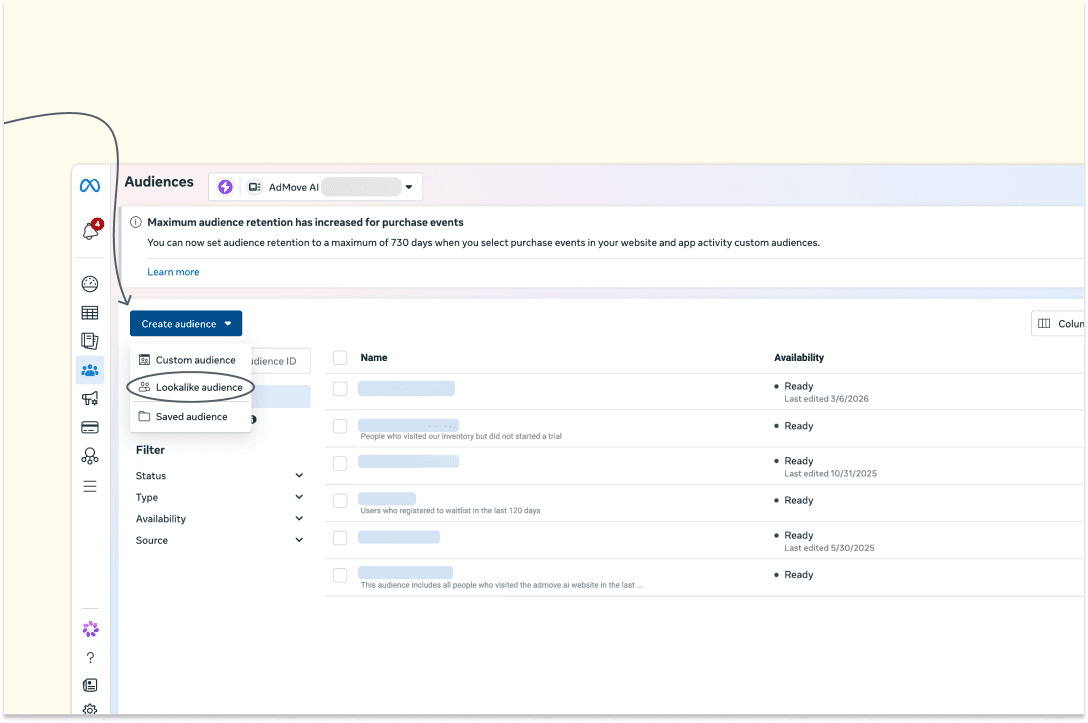
Open Audiences in Ads Manager. Go to Meta Ads Manager, then navigate to Audiences under the Assets menu.
Select Create Audience, then Lookalike Audience. This opens the lookalike configuration panel.
Choose your source audience. Select the Custom Audience you want to use as the seed. If you are uploading a new customer list, choose “Create new source” and follow the CSV upload flow: format your file with columns for email, phone number, or both, then upload and wait for Meta to match the records.
Select the target country. Lookalikes are country-specific, so pick the market where you want to find new prospects.
Set the similarity percentage. Choose between 1% (tightest match, smallest audience) and 10% (widest reach, weakest similarity). You can create up to six lookalike ranges from a single source in one step.
Click Create Audience. Meta begins building the lookalike. Full population takes 6 to 24 hours.
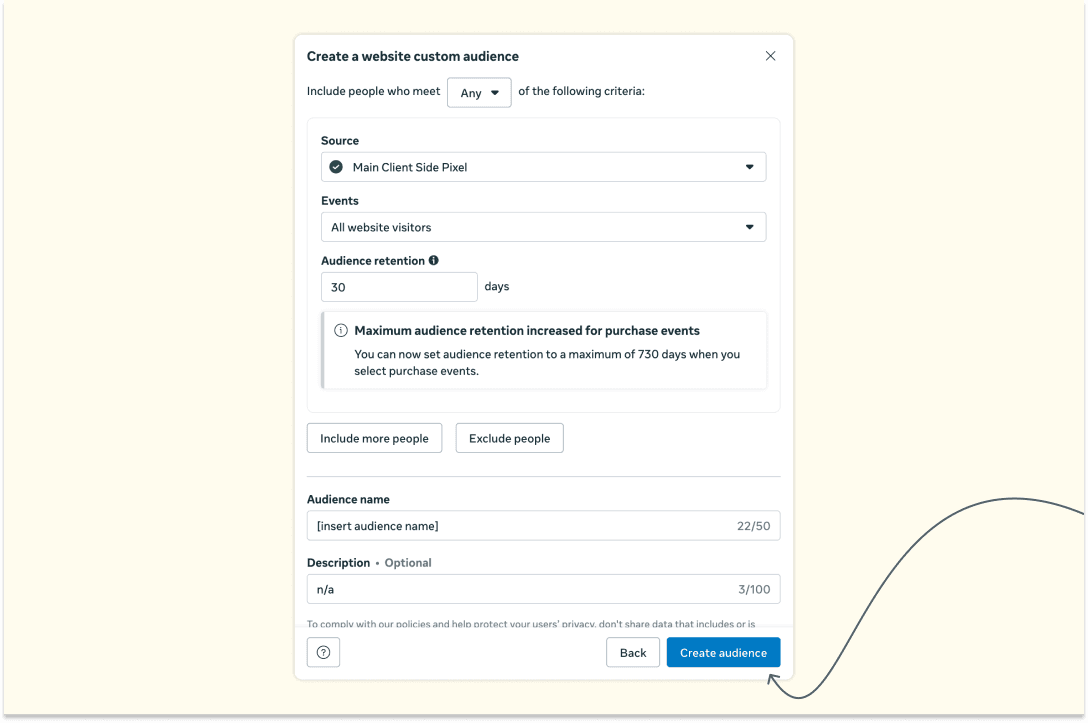
The audience appears in your Audiences list once ready and can be applied to any ad set. Each ad account supports a maximum of 500 custom audiences, and that limit includes lookalikes.
Advertisers in Special Ad Categories (housing, employment, and credit) face restrictions on lookalike targeting following a June 2022 DOJ settlement with Meta over discriminatory ad delivery. These categories use a modified “Special Ad Audience” instead of standard lookalikes.
Optimization best practices
Getting better results from lookalike audiences takes ongoing testing and maintenance beyond the initial setup. These practices apply whether you are running a fresh campaign or troubleshooting one that has plateaued.
Launch with a 1% lookalike for your primary conversion campaign, then run a separate ad set at 3% to 5% to see if the volume increase justifies the CPA trade-off. Avoid combining all customers into one source list. Separate purchasers by product category, average order value, or recency so each lookalike targets a distinct behavioral pattern.
When budgets are small and you need tighter early results, layer interest or demographic targeting on top of the lookalike. Remove those layers as you gather enough conversion data for the algorithm to work with. On the exclusion side, remove existing customers, recent converters, and users already in other active lookalike ad sets to cut audience overlap and wasted spend.
The lookalike auto-refreshes every few days, but it draws from your Custom Audience. If the source list is six months old, the lookalike is optimizing toward outdated behavior, so update your seed data on a regular schedule. Keep an eye on frequency as well. Anything above 2.5 signals audience saturation (Balistro), and the fix is usually rotating creatives or swapping to a fresh source audience.
Lookalike audiences in 2026: what changed
Lookalike audiences in 2026 are no longer the primary scaling lever they were between 2015 and 2023. The shift traces to one system: Meta Andromeda.
Andromeda is a retrieval-augmented ad delivery system that Meta fully deployed across most campaign objectives by October 2025. Before Andromeda, audience definitions like lookalikes controlled which users saw an ad. After Andromeda, the system matches ads to users based on creative content as much as audience settings. A carousel ad featuring running shoes and a UGC testimonial video for the same product will reach different users even within the same ad set, because the system reads the creative itself as a targeting signal.
In practice, a lookalike audience no longer acts as a hard boundary. It functions as a signal seed, a starting hint that gives the algorithm a direction. The system serves ads well beyond the set percentage range whenever it finds likely converters.
Lookalikes have moved from primary scaling tool to mid-funnel signal. They still tell the algorithm where to start looking, but under Andromeda, the creative does most of the actual targeting work.
Lookalike vs. broad targeting vs. Advantage+ Audience
Three targeting approaches compete for budget in a 2026 Meta ads account, each making a different trade-off between advertiser control and algorithmic freedom.
Types | Lookalike Audience | Broad Targeting | Advantage+ Audience |
Audience control | Advertiser defines seed and percentage | No audience inputs | Optional seed as suggestion, not constraint |
Data requirements | Custom Audience with 100+ users | Pixel or conversion history | Pixel or conversion history |
Best use case | Mid-funnel prospecting with a proven seed | Top-of-funnel when creative is strong | Full-funnel, Andromeda-native delivery |
Typical cost profile | Higher CPM, tighter targeting | Often lowest CPA at scale | Varies by algorithm performance |
Creative dependency | Moderate | High (creative IS the targeting) | High |
A 2025 benchmark study across e-commerce ad accounts found that broad targeting delivered 49% higher ROAS than lookalikes in the same dataset, while lookalikes carried a 45% higher average CPM. These are single-source figures and should be treated directionally. Still, they illustrate the cost dynamics behind the shift toward algorithmic targeting, and accounts with mature pixels and high conversion volume tend to see the strongest results from broad and Advantage+ approaches.
Advantage Lookalike is Meta’s auto-expansion option that allows the algorithm to serve ads beyond your set percentage range when it identifies likely converters outside the original audience. It is enabled by default in many campaign types, which means your “1% lookalike” may already be reaching users outside the 1% boundary.
The most reliable way to choose between these three approaches is a structured test: same creative, same daily budget, three audience types. Let CPA and ROAS determine the winner for your specific account and offer. Results depend on creative quality, pixel maturity, and conversion volume, so no single recommendation holds across all advertisers.
Custom Audience vs. Lookalike Audience vs. retargeting
A Custom Audience is a group of people an advertiser already knows, built from first-party data like email lists, website visitors, or app users. Lookalike Audiences take that known group and use Meta’s algorithm to find new people with similar characteristics. Retargeting sits at the other end of the funnel. It re-engages people who already interacted with the brand through website visits, video views, or past ad clicks.
Types | Custom Audience | Lookalike Audience | Retargeting |
Purpose | Reach known contacts on Meta | Find new users similar to known contacts | Re-engage people who already showed interest |
Data source | CRM lists, pixel data, app activity, on-platform engagement | Derived from a Custom Audience | Pixel events, engagement events, customer lists |
Audience familiarity | Known users | Unknown users (new prospects) | Previously engaged users |
Funnel stage | Mid-to-bottom (existing relationship) | Mid-funnel (prospecting) | Bottom-funnel (re-engagement) |
Best use case | Upsells, loyalty campaigns, exclusions | Scaling acquisition beyond existing audience | Cart abandonment, re-engagement, sequential messaging |
These three are not competing options. In a full-funnel strategy, they work as layers. Retargeting covers warm audiences at the bottom of the funnel, bringing back users who browsed or added to cart but did not convert. Lookalike audiences handle mid-funnel prospecting, finding new users modeled on the behaviors of existing buyers. Broad or Advantage+ Audience picks up cold top-of-funnel traffic, where creative quality and Andromeda’s matching do the heavy lifting.
Under the Andromeda model, the boundaries between these approaches have blurred somewhat. Advantage+ Audience can function as prospecting, retargeting, and everything in between depending on what the algorithm decides. But the core logic of the funnel still holds: retarget the warm, prospect with lookalikes, and let algorithmic targeting handle the widest cold pool.
The accounts seeing the best results now run lookalikes alongside broad and Advantage+ audiences, test all three against the same creative set, and let performance data decide the budget split. Creative diversity matters at least as much as audience selection, and probably more. If you are building or refreshing your prospecting stack, tools like AdMove can help produce the creative volume needed to feed these algorithmic delivery systems, but regardless of the tooling, the principle is the same: test targeting approaches head to head, read the numbers, and stop treating any single audience type as the default.