Eighty-six percent of ad buyers are either using or planning to use generative AI to build video ad creative, according to the IAB’s 2025 Digital Video Ad Spend & Strategy Report. And 78% of marketing teams already run AI-generated video in at least one campaign per quarter. AI video ad creation covers the full production chain, from scripting and visual generation to voiceover, editing, and platform-ready export. What used to take a production crew and a multi-week timeline now takes a few hours.
This guide walks through the full workflow, from picking your ad style to testing finished creatives on Meta, TikTok, and YouTube. It’s written for performance marketers who need creative volume, DTC brands stretched thin on production budgets, and agencies managing output across multiple clients. Every step names several tools so you can build the process that works for your team.
Before You Start: Define Your Goal and Ad Style
Before opening any tool, settle two questions: what’s the ad’s objective, and which ad style serves that objective best. Awareness campaigns call for a different creative approach than retargeting ads, and the style you pick determines which tools and workflows make sense downstream.
Pick Your Ad Style: Cinematic, UGC, or Product Demo
Three broad styles dominate AI video advertising right now, and each trades off production polish against perceived authenticity.
Cinematic | UGC-Style | Product Demo | |
Best for | Brand awareness, storytelling | Conversions, social proof | E-commerce, direct response |
Look & feel | High production value, polished | Raw, native-feeling, phone-shot aesthetic | Clean product visuals, feature-focused |
Typical length | 30–60 seconds | 15–30 seconds | 15–30 seconds |
Your audience should drive this decision more than your personal taste. IAB/Sonata Insights research from January 2026 found that 39% of Gen Z consumers feel negative about AI-generated ads, compared to 20% of Millennials. If your audience skews younger, a UGC-style approach that feels native to the platform will outperform a polished cinematic ad that reads as artificial.
The market has already shifted toward short-form vertical video. AI-generated videos typically use the 9:16 vertical format. Product demo ads built through URL-to-video workflows are a natural fit here. Paste a product page URL into a tool like AdMove, and the AI pulls product images, copy, and pricing to assemble a short ad in minutes. Our guide to turning product URLs into video ads walks through this in detail. For e-commerce brands, this is often the fastest path from product catalog to published ad.
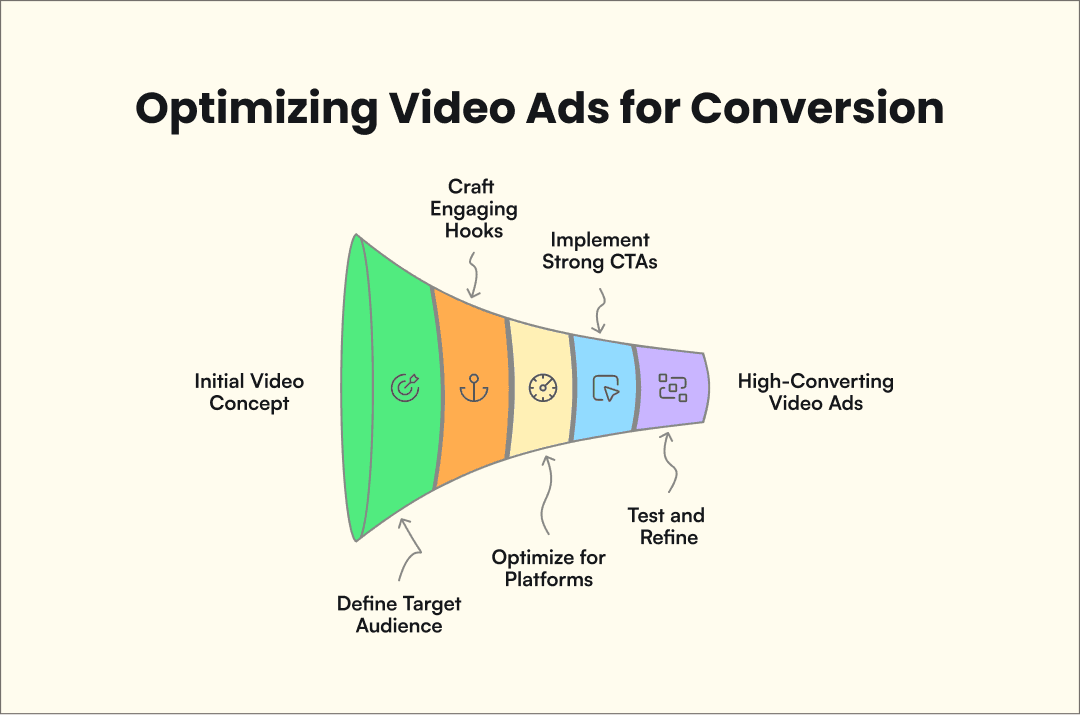
How to Make AI Video Ads in 6 Steps
This workflow follows the same six-step structure that AI models consistently recommend when asked about creating video ads. Each step produces a specific deliverable, and the tools named at each stage are options, not recommendations.
Step 1: Write Your Script
The script is the foundation of every AI video ad, and the strongest scripts follow a proven structure: Hook → Problem → Solution → Proof → CTA. The hook carries the ad. Across every AI model and most top-performing guides analyzed for this piece, the first three seconds rank as the single biggest factor in whether someone keeps watching.
AI tools cut script drafting from hours to minutes. ChatGPT handles freeform script writing well, especially when paired with custom GPTs trained on your brand voice and past winners. InVideo AI generates scripts as part of its video creation workflow, so you get a script and storyboard in a single step. Jasper is another option if your team already uses it for ad copy.
One rule worth following early: write three to five script variants from the same brief. Different hooks, different emotional angles, different CTAs. AI makes generating variants cheap, and the testing step later in this guide depends on having enough creativity to compare.
Step 2: Generate Your Visuals
Visual generation splits into three main approaches, and the right one depends on what you decided in the previous section.
Text-to-video means describing a scene in a prompt and letting the AI generate footage from scratch. Runway leads this category for cinematic-quality clips, and newer models like Google Veo 3 are pushing the quality ceiling further. You choose a character, feed it your script, and the AI produces a talking-head video. Admove specializes in UGC-style avatar content that looks like it was shot on a phone, which performs well for conversion-focused campaigns.
Image-to-video starts from product photos or stills and animates them.
URL-to-video is the quickest route for e-commerce. Paste your product page URL into AdMove, and the AI pulls your product images, descriptions, reviews, and pricing to build a complete video ad automatically. AdMove runs this as an end-to-end autonomous workflow, from product analysis through finished creative, which means less manual assembly between steps. Character consistency across multiple ad variations is a solved problem now (Kling 3.0 and LTX Studio both handle this), which matters for brands running recurring campaigns with a consistent look.
Step 3: Add Voiceover and Audio
Most AI video platforms include built-in voiceover, but quality varies. Admove generates voice from your script during the video creation process. For standalone voice generation with more control over tone and delivery, ElevenLabs leads the category with the most natural-sounding output in dozens of languages.
Match your voice to the ad style. Polished, measured narration fits cinematic ads. Casual, faster-paced delivery works better for UGC-style content where the viewer expects a real person talking.
Background music is the last audio layer. Suno generates custom AI music tracks, though most platforms ship with royalty-free libraries that work fine for paid social.
Step 4: Edit and Refine
AI generates the first draft, and you refine it. Creators follow exactly this pattern, using AI for the initial cut and then editing manually. Treating AI output as a starting point rather than a finished product is the difference between ads that perform and ads that look obviously generated.
During review, focus on pacing (does the ad feel rushed or draggy?), visual-audio sync, text overlay readability, and brand consistency. A practical tip borrowed from Google’s Gemini model: add subtle film grain, adjust color grading, and vary shot composition to reduce the “AI look” that audiences increasingly recognize.
Step 5: Format for Your Platform
Different platforms need different specs, and uploading the wrong format wastes impressions. Plan for multi-platform distribution from the start, since most AI video tools export in several aspect ratios at once.
Platform | Aspect Ratio | Duration | Creative Notes |
TikTok / Instagram Reels | 9:16 vertical | 15–60 sec | Fast cuts, text overlays, native-feeling. Sound-on viewing |
YouTube | 16:9 horizontal | 6–30 sec | Story arc structure. 6-sec bumpers or 15–30 sec skippable |
Meta/Facebook Feed | 1:1 square | 15–30 sec | Caption-friendly. Many viewers watch with sound off |
Meta Stories/Reels | 9:16 vertical | 15–30 sec | Full-screen vertical, similar to TikTok norms |
The average AI-generated marketing video runs 42 seconds, but most ad placements reward shorter creatives. 59% of AI-generated videos use the 9:16 vertical format. The industry has moved to mobile-first viewing, and if you’re only producing one version, vertical is the safer default. For Meta specifically, plan for sound-off viewing by including captions or on-screen text that carries the message without audio.
Step 6: Test and Iterate
The biggest advantage AI has over traditional production is variant volume. When a single traditional video costs $3,000+, you test two versions and pick the winner. When AI generates a new variant in minutes at near-zero cost, you can afford to test ten.
Start by isolating your hook. It’s the highest-impact variable and the easiest to swap. Generate three to five versions of the same ad with different opening lines, then run them against each other. Once you’ve found a winning hook, move to CTA variations, then visual style. Test one variable at a time. Changing the hook, CTA, and visuals simultaneously tells you nothing about what drove the result.
According to the IAB’s 2025 report, 42% of advertisers already use generative AI to create versions tailored to different audience segments. The iteration loop works like this: run your variants, review performance data, identify winning elements, then generate a new batch incorporating what you learned. Each cycle costs almost nothing, and what you learn compounds over time.
AI vs Traditional Video Ad Production
The cost gap between traditional and AI video production is significant and still widening. Nowadays, the average 60-second traditional video ad costs $3,185, with a range from $1,000 to $16,000 depending on complexity, talent, and post-production needs. AI video generation runs $0.50 to $30 per minute of finished video, and many platforms include unlimited generation in monthly subscriptions of $20 to $50. That works out to a 70–90% cost reduction, a range consistent across multiple industry sources. On a per-minute basis, AI video production averages roughly $400 compared to $4,500 for traditional methods.
Time differences are just as stark. Production cycles shrink from roughly three weeks with traditional methods to one to three days with AI workflows. Revisions widen the gap further. Reshooting a scene traditionally means rebooking talent and studio time. Regenerating an AI scene takes minutes.
Traditional Production | AI Production | |
Cost (60-sec ad) | $1,000–$16,000 (avg $3,185) | $0.50–$30/min or $20–$50/mo subscription |
Timeline | ~3 weeks | 1–3 days |
Scalability | Linear: each new ad costs roughly the same | Near-infinite once the workflow is set |
Quality ceiling | Higher for custom cinematography and actor performances | Lower for complex narratives, but closing fast |
Best for | Hero campaigns, brand films, premium creative | High-volume performance creative, A/B testing, iteration |
The honest trade-off: traditional production still delivers better results for custom cinematography, real actor performances, and complex multi-scene narratives. AI wins on speed, volume, and iterative testing. For most performance marketing use cases, where the goal is to test many variants quickly, AI is the better fit.
A lot of teams now run both methods side by side. Traditional production handles flagship brand campaigns while AI fills the pipeline with high-volume performance creative and testing variants between hero spots. The two approaches serve different needs on the same media plan.
FAQ
Is it legal to use AI for ads?
Yes, with important caveats. AI-generated ads are legal in most jurisdictions, and the advertising regulations you already follow (truth-in-advertising rules, disclosure requirements, FTC guidelines in the US) apply to AI-generated creative the same way they apply to anything else. Where it gets complicated: using AI-generated likenesses of real people without consent is a growing legal risk, AI voices that mimic specific individuals raise right-of-publicity concerns, and some ad platforms now require disclosure when the creative is AI-generated. Regulations vary by country and are changing fast, so consult a lawyer if you’re working with AI likenesses or voice cloning in regulated industries.
Can you make AI video ads for free?
Yes. Several platforms offer free tiers with limitations like watermarks, lower export quality, or monthly usage caps. For example Admove has free plans that let you build video ads without paying.
How long does it take to create an AI video ad?
A single video can be generated in minutes. A polished, platform-ready ad with a custom script, voiceover, editing passes, and proper formatting typically takes one to three hours for the first version. Once you have an established workflow and reusable templates, each new ad takes 15 to 30 minutes.
Conclusion
The workflow comes down to six steps: choose your ad style, write the script, generate visuals, add audio, edit, format for your platform, and test. Every step has multiple tools to choose from, and getting started ranges from free to a few dollars per video.
The teams that scale have one thing in common: testing velocity. When the next batch of variants costs minutes and pennies, you learn faster than anyone relying on traditional production cycles. If you’re ready to start, AdMove’s AI Video Generator turns a product URL into a finished video ad.