

A Facebook ad account is your entry point into advertising on the world's largest social platform. With over 2.11 billion daily active users as of 2025, Facebook remains the single biggest paid media channel for businesses of any size. Roughly 30 to 45% of small businesses run Facebook ads at least monthly. If you've just opened your account, you're in the right place
New accounts need to earn trust before they can scale, and the way you spend your first 30 days determines how fast that happens. This playbook walks you through everything, from creating your Meta Business Portfolio and installing tracking to launching your first campaign, reading the data, and finally lifting those spending caps. By day 30, you’ll have a verified, warmed-up account running optimized campaigns. Here’s the full breakdown.
Week 1: Build Your Foundation
Create Your Business Portfolio, Ad Account & Payment Setup
Start by creating a Meta Business Portfolio, the parent container that holds your ad accounts, Pages, pixels, and team access. Meta renamed Business Manager to Meta Business Portfolio in 2024, so if you see older tutorials referencing "Business Manager," they're talking about the same thing. Head to business.facebook.com and follow the prompts to set one up. New portfolios start with a limited number of ad accounts (typically one to five), and the cap increases as your account builds trust. Note that each person can manage up to 25 ad accounts across all their portfolios.
Next, create your ad account inside the portfolio. During setup, you'll choose a timezone and currency. Pick carefully: these two settings cannot be changed after creation. If you sell in USD but accidentally select EUR, you'll need to create an entirely new account. Once your account exists, open Meta Ads Manager to confirm it's live, then add a payment method immediately. Meta won't let you run ads without one, and payment history helps build account trust over time. You'll also see a billing threshold, the amount Meta charges you before resetting your balance, which starts low and increases as you spend reliably.
While you're in settings, configure team permissions. Meta offers three ad account roles:
Admin: full control over the account, billing, and permissions
Advertiser: can create, edit, and manage campaigns but can't change account settings
Analyst: view-only access to reporting and performance data
Assign the minimum permission each person needs. Enable two-factor authentication on every account with access, and then start business verification. Verification requires submitting legal documents confirming your business identity. It's not just a bureaucratic step; it's the fastest way to signal legitimacy to Meta and lift your spending limits sooner. Meta’s own documentation lists verification as one of the strongest trust signals for increasing daily caps.
Install Tracking: Meta Pixel & Conversions API
Your ad account is live, but without tracking, Meta has no idea what happens after someone clicks your ad. The Meta Pixel is a small piece of code you install on your website that records visitor actions: page views, add-to-carts, purchases, form submissions. It feeds this data back to Meta so the algorithm can learn which users are most likely to convert and show your ads to similar people. Without the Pixel, you're spending money blind.
The Pixel alone used to be enough. After Apple's iOS 14.5 update introduced App Tracking Transparency, browser-based tracking lost significant accuracy. That's where Conversions API (CAPI) comes in. CAPI sends conversion data directly from your server to Meta, bypassing browser restrictions entirely. Treat it as required from day one, not as an advanced add-on. You'll also want to complete domain verification in Events Manager, a quick step that confirms you own the domain and is necessary for full tracking on iOS devices. For platform-specific installation code, Meta's official developer documentation has step-by-step guides for Shopify, WordPress, and custom sites.
Week 2: Launch Your First Campaign
Campaign Structure, Objectives & Audiences
Every Facebook ad campaign follows a three-tier structure. The campaign level is where you define your objective, what you want to achieve. The ad set level controls who sees your ads, when they run, and how much you spend. The ad level is the actual creative: the image or video, headline, and copy your audience sees. This hierarchy stays the same regardless of what you're advertising.
For your first campaigns, three objectives cover most scenarios. Traffic sends people to a URL and is useful when you want visitors on a specific landing page. Leads collects contact information through forms, good for service businesses or list building. Sales (previously called Conversions) optimizes for purchases or high-value actions on your site. If you've installed your Pixel and CAPI correctly, Sales campaigns can start learning from conversion data right away. Turn on Campaign Budget Optimization (CBO) to let Meta distribute your budget across ad sets based on performance.
Objective | When to Use | Best For |
Traffic | You want visitors on a landing page or blog post | Content promotion, store visits, early-stage testing |
Leads | You need emails, phone numbers, or form submissions | Service businesses, B2B, newsletter growth |
Sales | You want purchases or high-value site actions | Ecommerce, SaaS trials, bookings |
For audiences, your new account has zero historical data, so Custom Audiences (built from your existing customers or website visitors) and Lookalike Audiences (people who resemble your converters) aren't available yet. Start with broad targeting or Advantage+ Audience, Meta's AI-driven targeting option recommended as a 2026 best practice by multiple practitioner sources. Let the algorithm learn from your first wave of data. Broad targeting feels counterintuitive when you know exactly who your customer is, but Meta's machine learning needs initial conversion signals before narrower targeting becomes effective. As conversions accumulate during Week 3 and beyond, you'll build retargeting audiences from real visitors and lookalikes from real buyers. There’s a reason this platform dominates paid media budgets: Triple Whale reports that ecommerce brands allocated 68.31% of their total ad spend to Meta in 2025.
Ad Formats, Creative & the $10/Day Question
Meta supports four main ad formats:
Image ads: the simplest to create and test, ideal for your first campaigns
Video ads: highest engagement across most placements, especially in Feed and Stories
Carousel ads: show multiple products or features in a single swipeable unit
Reels ads: Meta's fastest-growing placement, delivering 10 to 30% cheaper CPM (cost per 1,000 impressions) compared to Feed.
If you're producing creative on a tight budget, short vertical video in a UGC-style format, shot on a phone, conversational, and unpolished, consistently outperforms studio-grade production for cold audiences.
Design everything mobile-first. Mobile-optimized campaigns deliver 62% higher engagement than desktop-designed creative. That means vertical or square aspect ratios, large readable text, and a clear call to action visible without clicking.
So, can you run ads on $10 a day? Yes, but set realistic expectations. The global average CPC (cost per click) averaged $1.11 across 2025 but has since dropped to $0.85 as of January 2026. At $10/day, that's roughly 9 to 12 clicks. Enough to start learning, not enough to draw conclusions fast. Use daily budgets to begin with, and know that Meta can spend up to 75% more than your daily budget on any given day, averaging out over the week. This is a recent increase from the previous 25% cap, and some accounts may still be on the older limit. Don't panic when you see a $17 charge on a $10/day campaign. As a benchmark, Facebook ads deliver an average ROAS (return on ad spend) of 5.3x, outperforming Instagram at 4.8x and TikTok at 3.6x.
Week 3: Read the Data & Optimize
By now your campaigns have been running for a full week, and you should have enough data to make your first real optimization decisions. Open Ads Manager and focus on the metrics that matter. CTR (click-through rate) tells you if your ad is interesting enough to click. The median CTR across Facebook ads is 2.19%. If you're significantly below that, your creative or targeting needs work. CPA (cost per action) measures how much you're paying per conversion. The median CPA sits at $38.17, though this varies wildly by industry and what you count as a conversion. For context, lead-focused campaigns average around $27.66 per lead, while purchase-driven campaigns typically range from $35 to $55.
Metric | What It Tells You | Median Benchmark |
CTR | Are people interested enough to click? | 2.19% (Triple Whale, 2025) |
CPA | How much does each conversion cost? | $38.17 (Triple Whale, 2025) |
ROAS | How much revenue per dollar of ad spend? | 1.93 median (Triple Whale, 2025) |
CPM | How expensive is it to reach 1,000 people? | Varies by placement and audience |
The median ROAS across all Facebook advertisers is 1.93. If your campaigns are close to that number or above it, you're in a healthy range for a two-week-old account. If you're well below, dig into which ad sets are dragging the average down before cutting budget overall.
Use a simple kill-or-scale framework for your ad sets:
Turn off: if an ad set has spent at least 2x your target CPA without a single conversion, turn it off
Keep running: if an ad set is converting at or below your target CPA, keep it running and consider increasing its budget
Hold: for ad sets sitting in between, give them another 48 hours of data before deciding
Resist the urge to make changes too fast. Meta's algorithm needs time to exit the learning phase, and constant edits reset that process. Each ad set needs roughly 50 conversion events per week to fully optimize, so patience matters more than volume at this stage.
This is also the week to build your first Custom Audiences. Go to the Audiences section in Ads Manager and create audiences from website visitors (last 30 days), people who viewed specific product pages, and anyone who added to cart but didn't purchase. These retargeting audiences will become your highest-performing ad sets. Once you have at least 100 conversions, you can build Lookalike Audiences based on your actual buyers, giving Meta a clear signal of who to find more of.
Week 4: Scale With Confidence
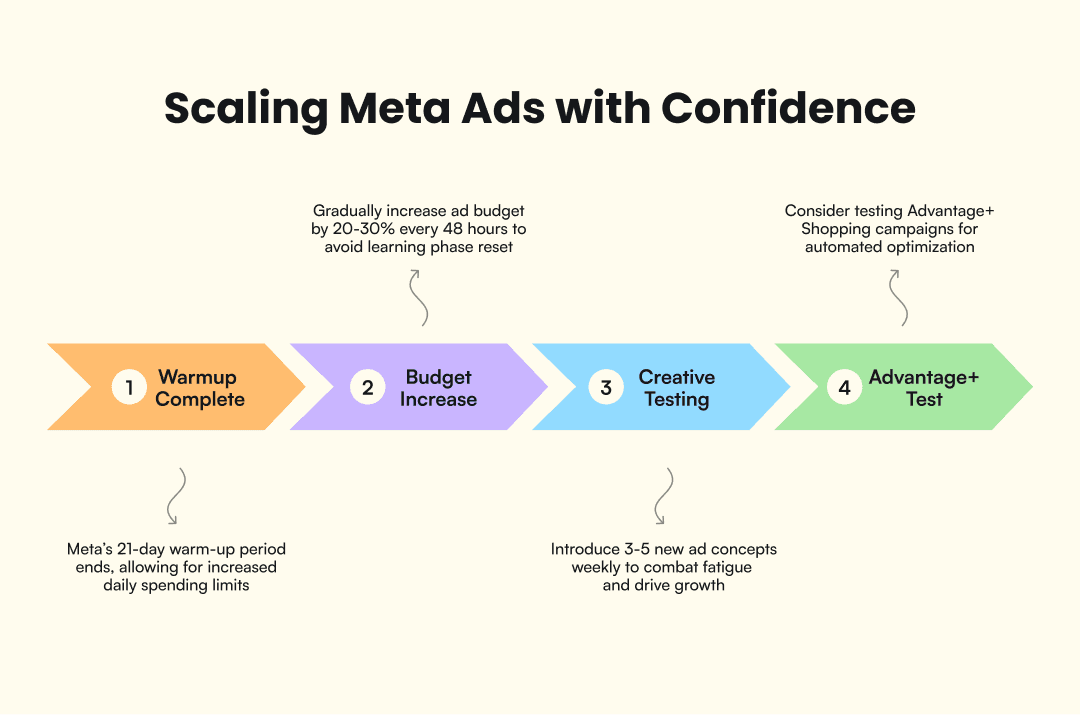
Your account is now roughly 21 days old, and that matters. Meta's warm-up period for new accounts typically lasts about 21 days. During this window, the platform gradually increases your daily spending limits as you demonstrate consistent payment history, policy compliance, and stable ad performance. If you started with a $50/day cap, you may now be able to spend $150 or more. Check your current limit in Ads Manager under Account Overview. If your account has been verified and your billing threshold has increased at least once, those are strong signals the warm-up is progressing well.
Scaling doesn't mean doubling your budget overnight. The practitioner consensus recommends increasing budgets by 20 to 30% every 48 hours. Larger jumps can re-trigger the learning phase, spiking your costs and destabilizing performance. If a campaign is converting well at $30/day, move it to $38, then $48 two days later. Steady, incremental increases preserve the signals Meta's algorithm has already learned.
This is also where creative testing becomes your biggest growth lever. At this stage, the ads that worked during launch may be showing early signs of fatigue: rising CPMs, declining CTR, or flat conversion rates. The fix isn't tweaking headlines on the same static image. It's testing fundamentally different concepts, new hooks, new formats, new angles. Advertisers using dynamic creative optimization have reported up to 18.4% lower CPCs compared to single-creative ad sets, though individual results vary. If you're running ecommerce campaigns, Advantage+ Shopping campaigns are worth testing now. They use Meta's machine learning to automatically choose placements, audiences, and creative combinations across your full catalog. For many ecommerce accounts, Advantage+ campaigns outperform manually configured campaigns within the first two weeks of testing.
The mental shift in Week 4 is this: your targeting doesn't scale, your creative does. Meta's algorithm already does a strong job finding the right people when given enough data. What it needs from you is a steady supply of fresh, varied creative to test. Building a weekly creative testing loop, where you introduce 3 to 5 new ad concepts every week and retire the underperformers, is what separates accounts that plateau from accounts that grow. For more on building a creative testing system, explore AdMove's creative testing approach.
What Comes After Day 30
Thirty days is enough to build a solid foundation, but it's the starting line, not the finish. You now have a verified business portfolio, working tracking infrastructure, conversion data flowing in, tested audiences, and a spending limit that's been lifted at least once. The accounts that keep growing beyond this point are the ones that maintain the habits you built during this month: reviewing data weekly, rotating creative, scaling budgets incrementally, and building lookalike audiences from real converters. Month two is where you shift from learning to compounding.
If producing enough fresh ad creative is the bottleneck, and it usually is for small teams, that's a problem worth solving early. A single high-performing ad can carry a campaign for two or three weeks, but creative fatigue is inevitable. The brands winning on Facebook in 2026 aren't the ones spending the most. They're the ones testing the most concepts, the fastest. Discover how AdMove can help you build that kind of creative velocity without adding headcount or burning out your design team.