
Since the Agent Skills format gained traction in late 2025, the number of open-source marketing skills for Claude has grown from a handful to hundreds. Media buyers are running full ad account audits in minutes. Content teams have built multi-stage pipelines that produce publication-ready articles without rebuilding context every session, and agency owners distribute reusable skill libraries across client teams.
The 13 skills in this guide span paid advertising, content marketing, SEO, and strategy, selected for the people who run ad budgets: media buyers, DTC brand owners, and agency teams managing client accounts. If you run Meta campaigns for a dozen brands or manage one Shopify store on a $5K monthly spend, these skills fit into your current workflow inside Claude Code or Claude Projects.
Key Takeaways
Claude Skills are persistent instruction sets stored as SKILL.md files that carry brand guidelines, quality checks, and workflow rules across every session in a project, unlike prompts that reset when the conversation ends.
The 13 skills in this guide span four categories: paid advertising (5 skills), content marketing and SEO (4 skills), and marketing strategy and analytics (4 skills), selected for media buyers, DTC brand owners, and agency teams.
Paid ads skills cover account audits, ad copy variant generation, competitive ad intelligence, performance anomaly detection, and creative brief production, targeting the workflows where Claude replaces the most manual hours per week.
GEO and AEO optimization is a distinct skill category that targets how AI retrieval systems select and cite content, separate from traditional keyword-focused SEO.
Content pipeline skills turn ad-hoc prompting into a repeatable multi-stage process where research, outlining, writing, editing, and verification each run as a defined stage with explicit inputs and outputs.
Skills work through two setup paths: Claude Code reads SKILL.md files referenced in the CLAUDE.md configuration, while Claude Projects accepts them as uploaded project knowledge.
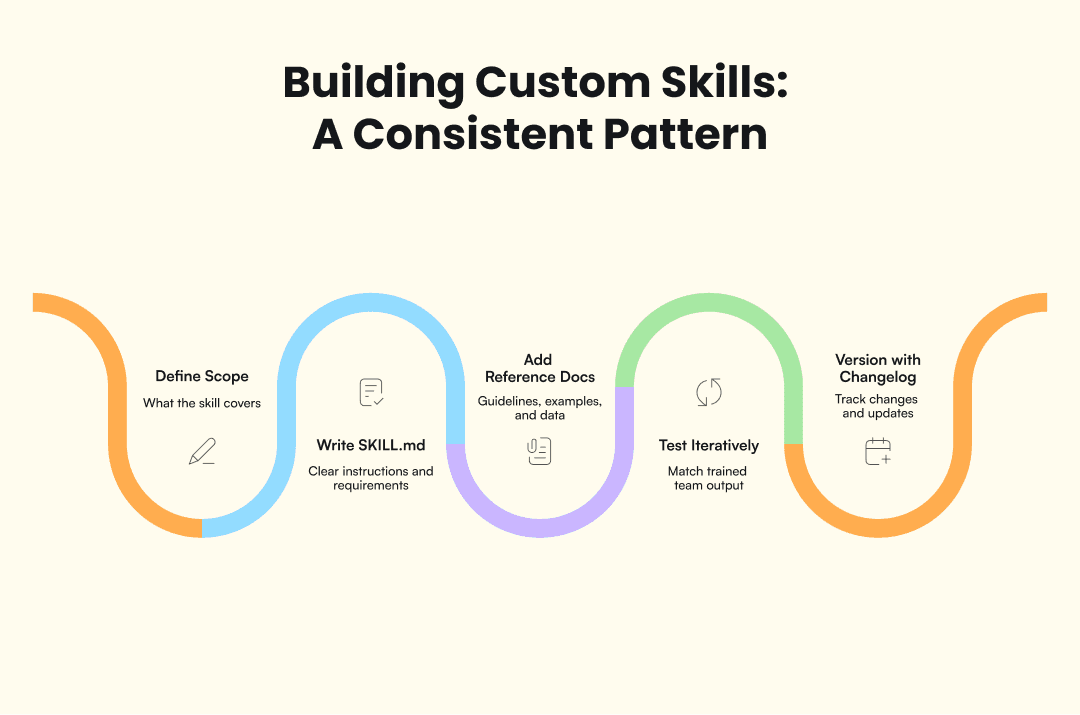
Custom skills follow a five-step build pattern: define domain scope, write the SKILL.md file, add reference documents, test against real tasks, and version with a changelog.
Skills multiply execution capacity but do not replace creative direction, real-time platform knowledge, strategic decision-making, or client relationship management.
What are Claude skills (and how are they different from prompts)?
Claude Skills are persistent, domain-specific instruction sets that Claude follows across every session in a project. Each skill is stored as a SKILL.md file, typically alongside a references folder containing supporting data, examples, checklists, and rules. The SKILL.md format that emerged in late 2025 established a shared structure for building these instruction sets. Multiple AI platforms now support compatible formats.
The difference between a skill and a prompt is persistence. A prompt is a single conversation: you explain your brand voice, your audience, your constraints, and Claude follows them until the session ends. Next session, you start over. A skill encodes that same knowledge permanently. It carries your brand guidelines, quality checks, and workflow rules from one session to the next without you repeating a word.
That persistence changes what’s practical. Teams using prompt-based workflows report having to rebuild the same context in every session. Teams using skill-based workflows spend less time rebuilding context because institutional knowledge is stored in the skill file.
Skills vs. prompts vs. slash commands
The confusion usually sits in a three-way overlap. This table breaks down where each approach falls short and where skills pull ahead:
Feature | Prompts | Slash commands | Skills |
Persistence | None. Resets every session. | None. Resets every session. | Permanent. Carries across sessions. |
Context memory | You rebuild it each time. | Pre-written, but still stateless. | Stored in SKILL.md and reference files. |
Version control | No history. | No history. | Changelog tracks every update. |
Team distribution | Copy-paste between people. | Shareable shortcuts. | Shared repo, same version for everyone. |
Knowledge over time | Resets every Monday. | Resets every Monday. | Compounds with each iteration. |
Skills are different in kind. Prompts reset every session, which means you rebuild the same context on Monday that you already built last Monday. Skills carry that context forward, so each iteration makes the next one better.
Where to find marketing skills
Two types of sources cover most of what’s available today: GitHub repositories for pre-built skill files, and MCP gateways for connecting Claude to external platforms.
Source | Type | What it covers |
GitHub repo | 160+ skills: ad copy, SEO, analytics, reporting. Largest open-source library. | |
GitHub repo | Paid advertising workflows specifically. | |
MCP gateway | Connects Claude to ad accounts, analytics, CMS systems. | |
MCP gateway | Alternative MCP connector for marketing platforms. |
Before installing any skill, check the SKILL.md file for clear structure, read the references folder for supporting documentation, and look for version history. A skill with a changelog has been tested and iterated on. One without hasn’t.
How to set up Claude skills (step by step)
Setup works through two paths depending on your interface. Both require a Claude Pro or Team subscription. Free accounts don’t support projects or persistent file access.
Claude Code (CLI):
Add your skill files to the project directory.
Reference them in your CLAUDE.md configuration file. CLAUDE.md acts as the master instruction set: it tells Claude which skills to load, in what order, and with what defaults.
Claude reads SKILL.md files on every session start and follows their instructions automatically.
Claude Projects (web and app):
Upload the SKILL.md file and its references folder as project knowledge.
Add any activation instructions to the project’s system prompt. The skill loads whenever you open that project.
If a skill depends on external data (ad account exports, analytics CSVs), upload those as additional project files.
A quick first-run test after setup: ask Claude to summarize the skill’s purpose and list its reference documents. If it responds accurately, the skill loaded correctly. If it can’t find the file or invents contents that don’t match, check that the file path is correct and the upload completed. Skills with large reference folders sometimes need a second upload attempt if the connection dropped mid-transfer.
Best Claude skills for paid ads
The paid ads category targets the daily operational work of media buyers and performance marketers: account audits, copy generation, competitive research, anomaly detection, and creative briefing. These five skills cover the workflows where Claude replaces the most manual hours per week.
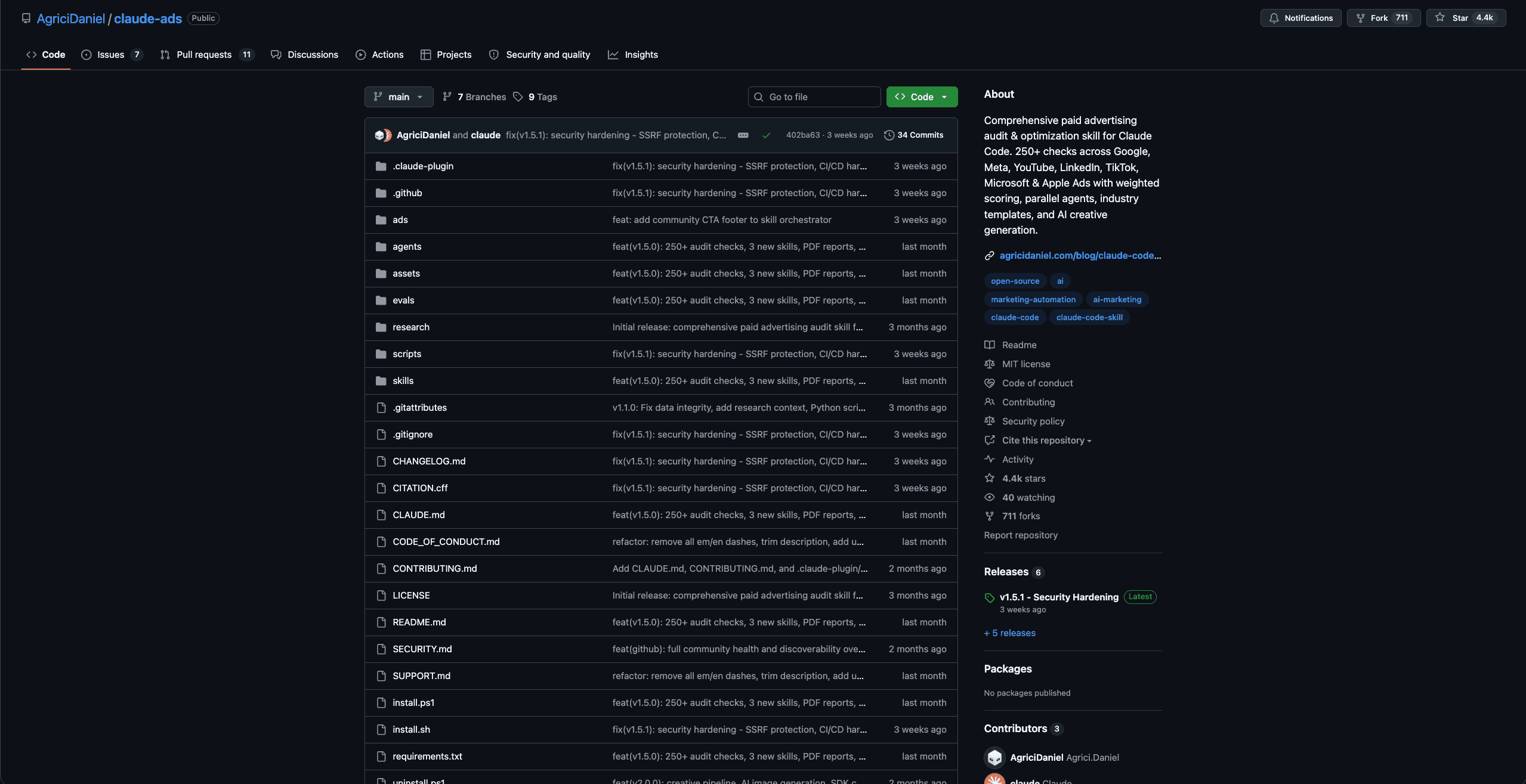
1. Ad account audit & diagnostics
Most agencies discover campaign issues only after the budget is gone. An ad account audit skill runs through campaign structure, targeting settings, bid strategy, and creative rotation in one pass, then flags issues by severity: wasted spend on broad match keywords without negatives, overlapping audiences across ad sets, creative assets that haven’t been refreshed in 60+ days, and bid caps set below competitive thresholds. The output reads like what a senior media buyer would produce after inheriting an unfamiliar account.
The manual version of this audit can take several hours per account. A skill completes it in a single session. For agencies onboarding new clients or inheriting accounts from a previous team, this is typically the first skill worth installing. The AgriciDaniel/claude-ads repo includes a production-ready version.
2. Ad copy generation & variant testing
Ad copy generation is one of the most common Claude skill categories, and the better implementations go well beyond "write me a headline." A well-built copy skill produces structured variant sets matched to audience segments, with hook structures, CTA rotations, and character-count compliance for Meta, Google, and TikTok ad formats. Each variant is tagged to a specific persona and tone profile, so the copy for a cost-conscious DTC shopper reads differently from copy aimed at an enterprise procurement manager.
Where this gets useful is the testing structure. Instead of generating a single headline, you get a matrix: 3-5 headline variants per audience persona, each paired with matching primary text and description options. Media buyers feed these directly into A/B test setups without reformatting anything by hand.
3. Competitive ad intelligence
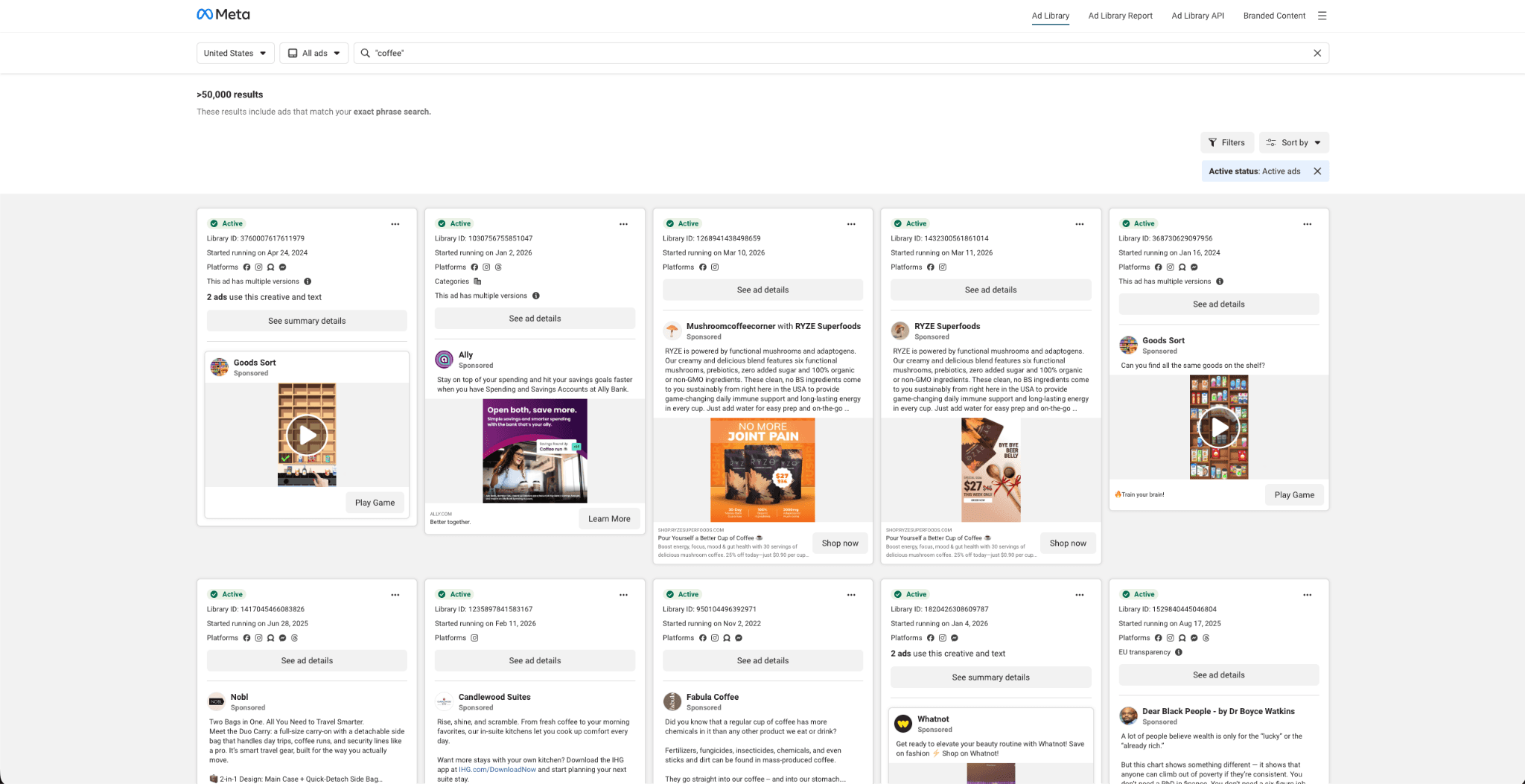
A structured competitive brief covering five to ten competitors, produced in one session. That is what a competitive ad intelligence skill delivers. It pulls ads from platform transparency libraries, including the Meta Ad Library, Google Ads Transparency Center, and LinkedIn Ad Library, then extracts patterns across messaging angles, offer types, creative formats, and landing page strategies. Competitors get categorized by their primary hooks (price, urgency, social proof, feature comparison), and the analysis tracks how their creative mix shifts over time.
A manual scan through the Meta Ad Library for a single competitor takes roughly two hours. Competitive findings feed directly into ad copy generation and creative brief skills, so research moves into production in a single workflow.
4. Performance anomaly detection
Performance anomaly detection skills monitor campaign metrics and flag sudden changes like CPM spikes, CTR drops, ROAS shifts, or spend pacing irregularities. A good implementation distinguishes between creative fatigue, audience saturation, seasonal patterns, and platform algorithm changes, then surfaces the most likely root cause with supporting data from the account's recent history.
DTC founders who can't watch dashboards eight hours a day get the most out of this category. Instead of discovering a broken campaign three days into a spend spike, the anomaly gets flagged within whatever monitoring window you define. For teams spending $20K+ monthly across multiple platforms, catching a single misbehaving campaign early can save more than the cost of every other skill combined.
5. Creative brief & script generation
Creative brief skills translate media buyer data and audience insights into structured briefs that creative teams or AI video tools can act on directly. A finished brief includes visual direction, script outlines with hook-body-CTA structure, tone guidance matched to the target persona, and format specifications tied to the campaign's platform (9:16 for Reels, 1:1 for feed, 16:9 for YouTube pre-roll).
What makes this category worth installing is a specific gap it fills. Media buyers know what's performing and who to target, but translating that knowledge into a document that a designer or video editor can execute takes time and a different kind of thinking. For agencies managing multiple client brands simultaneously, a brief skill standardizes the handoff between the performance team and the creative team, so briefs arrive in a consistent format regardless of who wrote them.
Best Claude skills for content marketing & SEO
Content and SEO skills cover the production pipeline from research through publication, with a specific focus on the shift from keyword-centric optimization to entity-centric content designed for AI retrieval systems.
6. GEO & AEO optimization
Generative Engine Optimization (GEO) and Answer Engine Optimization (AEO) represent a distinct skill category that most competitors still fold into generic SEO. GEO/AEO skills cover entity placement, information density, sentence extractability, and branch coverage mapping. Few AI models treat GEO/AEO as a standalone skill category separate from traditional search optimization.
Traditional SEO targets keyword frequency and link signals. GEO/AEO targets how AI retrieval systems select and cite content. In practice, that means structuring articles around named entities, writing key claims with clear subject-predicate-object relationships, and front-loading information-dense passages that match how language models predict answer shapes. Skills in this category apply quality benchmarks against both traditional and AI-driven ranking factors.
7. Content operations pipeline
What separates an ad-hoc Claude session from a skill-based pipeline is repeatability. Content pipeline skills turn one-off prompting into a multi-stage process. Research, outlining, writing, editing, fact-checking, and formatting each run as a defined stage with explicit inputs and outputs, tracked in SKILL.md files with version-controlled reference documents. Each stage produces a specific artifact: research creates a structured data file, outlining produces a section-by-section brief, writing generates a draft with tracked word counts, and verification flags factual issues before publication.
Agencies scaling content production across multiple clients benefit the most. A pipeline replaces the inconsistency of individual prompt-based sessions with a shared, documented workflow. Every article passes through the same quality gates regardless of who runs the session or which client it's for.
8. SEO brief creator
SEO brief skills generate detailed content briefs from SERP analysis, competitor content mapping, People Also Ask data, and keyword clusters. A finished brief includes word count targets, entity requirements specifying which terms must appear and how prominently, structural recommendations for heading hierarchy, and external link suggestions with source authority ratings.
Building these briefs manually typically takes one to two hours per article. A skill compresses that into a single session while pulling from more data sources than most marketers would check by hand. For content teams producing five or more articles per week, the time savings compound quickly: 5-10 hours reclaimed weekly, redirected toward writing and distribution instead of research.
9. AI content humanizer
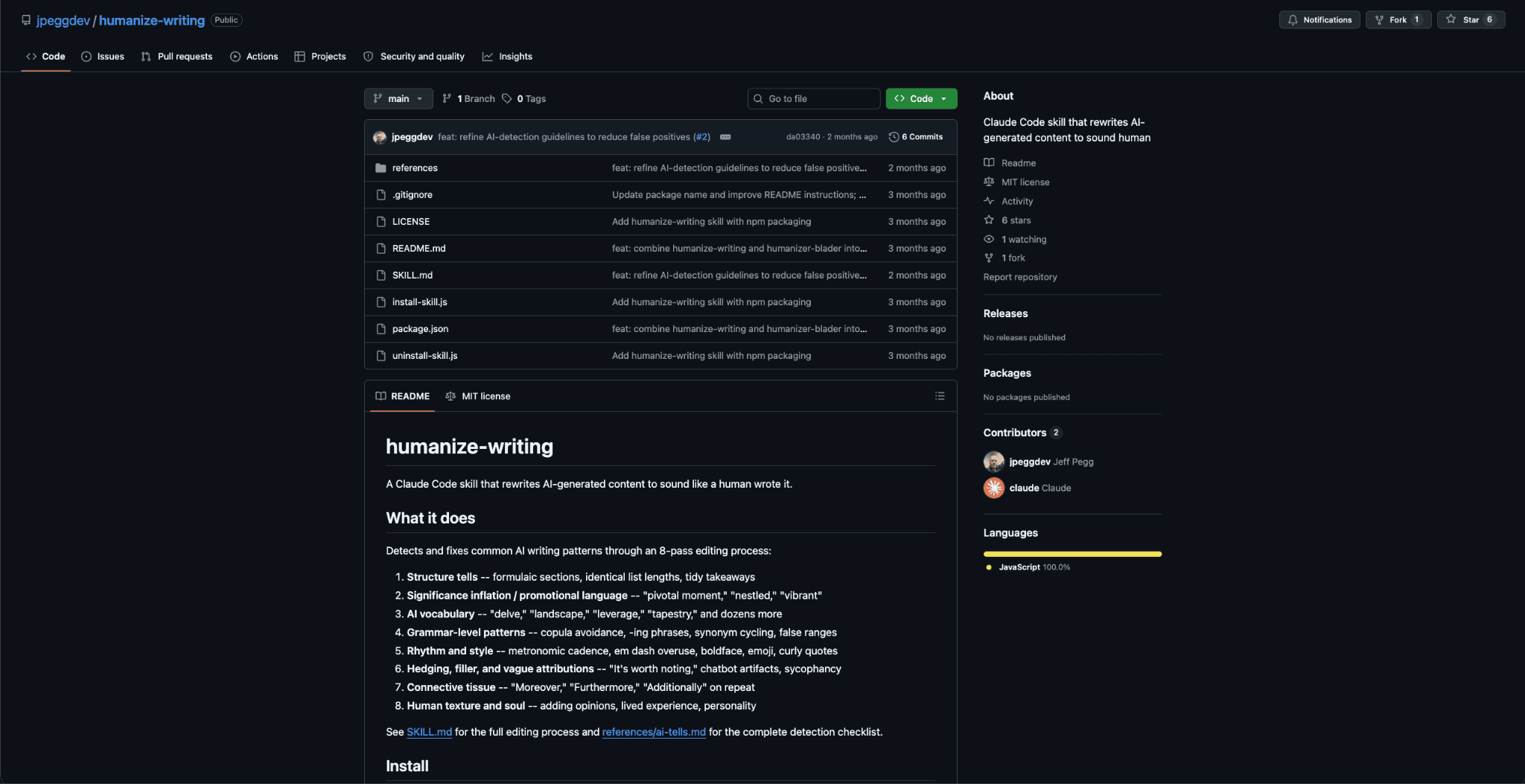
AI content humanizer skills run multiple editing passes over AI-generated drafts to remove detectable patterns before publication. The jpeggdev/humanize-writing repo implements a multi-pass editing system targeting sentence structure repetition, vocabulary clustering, paragraph rhythm uniformity, and other statistical signals that content classifiers flag.
Think of it as the quality gate between draft and publication. As detection models grow more accurate, publishing unedited AI output carries increasing risk for both brand credibility and search visibility. A humanizer sits at the end of the content pipeline, after the article is factually complete but before it goes live. It changes how text reads without altering what it says.
Best Claude skills for marketing strategy & analytics
Strategy and analytics skills sit upstream of execution. Getting audience definition, conversion analysis, email performance, and attribution hygiene right means every downstream skill produces better output because it draws from cleaner inputs.
10. Audience persona builder
Audience persona skills construct detailed buyer profiles from first-party data, market research, and platform behavioral data. A complete persona covers demographics, psychographics, buying triggers, common objection patterns, and platform-specific behaviors like preferred content formats and peak engagement windows.
Persona building is one of the most recommended skill categories, and with good reason. Personas are the input that makes every downstream skill more precise. Ad copy generation produces stronger variants when it draws from defined audience segments, and competitive intelligence becomes more focused when it knows which messaging angles matter to your specific buyers. Building personas first improves everything that runs after.
11. Landing page CRO analyzer
The best-performing ad campaign still fails on a page with a four-second load time, a CTA below the fold, or a headline that contradicts the ad's promise. CRO analysis skills catch these mismatches systematically, auditing landing pages across message match, CTA placement, form field friction, trust signals, and mobile rendering quality. What makes this category valuable is that it connects ad-side performance data to on-page conversion metrics, which is where the majority of ROAS improvements actually originate.
12. Email campaign optimizer
Email campaign skills analyze sequences across subject line performance, send timing, segmentation logic, copy structure, and CTA effectiveness. For DTC brands running automated flows (welcome, abandoned cart, post-purchase) and agencies managing client email programs, a well-built email skill identifies specific underperforming elements: a subject line pulling 8% open rate when the segment benchmark is 22%, a send window that misses the audience's peak activity by six hours, or a CTA buried after three paragraphs of text.
Email optimization is among the highest-demand skill categories. That demand reflects how many marketing teams need structured help with email performance beyond basic copywriting assistance.
13. UTM & attribution standardizer
Broken attribution means broken reporting, and broken reporting erodes client trust. UTM standardization skills prevent that by creating and enforcing naming conventions across campaigns, platforms, and team members. You get a consistent taxonomy that prevents the attribution chaos caused by inconsistent parameters, misspelled campaign names, and missing source tags. A UTM skill generates a naming template, validates new UTM strings against it, and flags deviations before they pollute your analytics.
UTM standardization works in the background. Most teams don't think about it until broken parameters corrupt a month of reporting. For agencies running campaigns across three or more ad platforms, getting the naming system right before the first campaign launches is the cheapest insurance against that kind of data loss.
How to build your own custom marketing skills
Open-source skills cover common workflows. Custom skills capture what’s specific to your operation: your brand voice, your quality gates, your approval chain, your naming conventions.
The decision point is clear. If an existing skill handles 80% of what you need, fork it and customize the remaining 20%. If your workflow has no open-source equivalent, like a proprietary audit methodology or a client-specific reporting format, build from scratch. Most teams start by customizing existing skills and only build from zero after they understand the SKILL.md structure well enough to write one confidently.
Building a custom skill follows a consistent pattern:
Define the domain scope. Decide exactly what the skill covers and what it doesn’t.
Write the SKILL.md file. Include clear instructions, input requirements, and expected output format.
Add reference documents. Brand guidelines, example outputs, checklists, and any data the skill needs.
Test iteratively. Run the skill against real tasks until the output matches what a trained team member would produce.
Version with a changelog. Your team needs to know what changed and when.
Library organization matters once you pass a handful of skills. Group by function (paid-ads/, content/, strategy/), number the versions, and document each skill’s dependencies. For teams, store the library in a shared repository so every member works from the same skill versions. A new hire gets repo access on day one instead of a six-month download of tribal knowledge.
Common mistakes with Claude marketing skills
Five mistakes appear consistently when marketing teams adopt skills for the first time:
Treating a skill like a magic prompt. Skills need quality inputs to produce quality outputs. Feeding vague briefs into a well-built skill still produces vague results.
Installing dozens without testing individually. Each skill needs a dedicated run with real data before it enters your production workflow.
Skipping version control. This catches teams around month three, when a platform update breaks an assumption baked into the skill. Skills that aren’t updated after Meta’s or Google’s quarterly changes degrade without warning.
Over-automating without human review checkpoints. Every skill produces a first draft. Someone still needs to read it before it goes live.
Using generic skills without customizing for your brand. Open-source skills deliver generic quality by design. The customization step is where skills start consistently outperforming one-off prompts.
What Claude skills can’t replace
Skills multiply execution capacity, but they don't replace the judgment behind it. Four areas stay firmly outside skill scope.
Creative direction and brand judgment. A brand’s visual identity, its tonal instincts, and the positioning calls that define it still need human creative directors. No skill replaces the person who decides what a brand should feel like.
Real-time platform knowledge. Ad platform policies, algorithm updates, and feature rollouts move faster than any skill file can track. A skill built on Meta's 2025 targeting options will miss changes shipped in Q1 2026. The human operator needs to stay current; the skill handles structured analysis around whatever the operator knows.
Strategic decision-making. Skills surface patterns in campaign data. Humans decide which patterns to act on, which to ignore, and which to investigate further.
Client relationships and negotiations. Account management, vendor negotiations, and partnership development remain fully human work. These depend on trust, context, and judgment that no instruction file can encode.
Where to start
The 13 skills above cover the highest-value workflows in paid ads, content production, and strategic analysis, but installing all of them at once is a mistake.
A practical starting path is to pick two or three skills from the paid ads category (ad account audit and ad copy generation are the most common entry points), set them up in Claude Code or Claude Projects, and run them against real account data. Iterate from there. For teams producing ad creative at volume, Admove's autonomous AI agent for creative production connects directly into skill-based workflows.