
Your ads didn’t break overnight without a reason. Something specific changed (a billing flag, a fatigued creative, a tracking gap your dashboard can’t show you), and this guide will help you find it.
Conversion rates declined across 80% of industries in Facebook lead campaigns during 2025, according to WordStream’s September 2025 benchmarks. If your Ads Manager numbers look worse than they did six months ago, you’re not imagining it. The platform itself has shifted under your feet. Meta Pixel accuracy has eroded, creative fatigue cycles have shortened, and attribution models have changed.
This guide uses a three-phase diagnostic framework: delivery problems (your ads aren’t spending), performance problems (your ads are spending but results tanked), and measurement problems (your ads might still work, but your data says otherwise). Each phase has different causes, different symptoms, and different fixes.
Whether you’re a media buyer troubleshooting a client account, an agency owner watching ROAS collapse across multiple brands, or a DTC founder staring at a dashboard that stopped making sense, start by identifying which type of problem you’re facing. The diagnosis determines the fix.
Diagnose Your Problem: Delivery vs. Performance vs. Measurement
Most advertisers assume they have a performance problem. They see worse numbers in Ads Manager and jump straight to changing audiences or killing creatives. But “my ads stopped working” splits into three different problems with three different root causes, and fixing the wrong one wastes both time and budget.
Use this table to identify your problem type based on what you’re actually seeing:
Delivery | Performance | Measurement | |
Symptoms | Ads not spending, status stuck on “Not Delivering” or “In Review,” zero impressions | Ads running but CPA doubled, CTR dropping, frequency climbing past 3.0 | Conversions disappeared overnight, ROAS looks impossible, Meta data doesn’t match Shopify or GA4 |
Common Causes | Billing failures, bid caps set too low, policy violations, budget below minimum threshold | Creative fatigue, audience saturation, learning phase disruption, poor campaign structure | Meta Pixel blocked by browsers or ATT, Conversions API not installed, attribution window changes, 72-hour reporting delay |
First Thing to Check | Delivery Column status in Ads Manager + Billing section | Frequency at the ad level + creative launch dates | Events Manager match quality score + compare Meta data vs. backend conversions |
Severity | Usually a quick fix (minutes to hours) | Medium. Requires creative refresh or structural changes | Can be invisible for weeks. Highest risk of misdiagnosis |
Find your symptoms in the table above, then jump to the matching section below. If your symptoms span two columns, read both. Overlapping problems are common, and a measurement gap can easily look like a performance drop.
Delivery Problems: Settings, Budget, and Policy Fixes
If your ads aren’t spending at all, the cause is usually something simple and fixable within Ads Manager. Work through these in order. They’re ranked from most common to least.
Billing and payment failures. An expired credit card or a failed payment silently pauses your entire account. Meta doesn’t always send a clear notification; your campaigns just stop spending. Check the Billing section in Business Settings first, and confirm your Account Spending Limit hasn’t been reached. This is the single most overlooked cause of “my ads stopped working.”
Bid strategy misconfiguration. Cost Cap and Bid Cap both restrict how much Meta can bid in the auction. Set either too low and your ads get priced out entirely, with zero delivery and zero impressions. Highest Volume has no cap and spends freely, but burns budget fast on low-quality placements if your conversion event isn’t well-defined. If delivery dropped after a bid strategy change, that’s your answer.
Budget below minimum threshold. Conversion campaigns need enough budget to generate roughly 50 conversion events within 7 days to exit the learning phase. If your daily budget can’t support that volume, your campaign stays in Learning Limited and delivery throttles.
Policy violations and ad rejections. Check the Account Quality dashboard for flags. Common triggers in 2026: health claims without disclaimers, restricted product categories, and “before/after” imagery. Meta’s automated moderation has grown more aggressive and less transparent. Ads get rejected without clear explanations more often now. See Meta’s ad policy guidelines for the full list of restricted categories.
Delivery Column status labels. These tell you exactly where your campaign is stuck:
Status | What It Means |
Active | Running normally |
In Review | Waiting for Meta’s approval. Allow 24–48 hours |
Learning | Gathering data, performance is unstable. Don’t edit |
Learning Limited | Not getting enough conversions to exit learning. Increase budget or broaden audience |
Not Delivering | Paused, out of budget, rejected, or scheduling conflict. Check the tooltip for specifics |
Ad scheduling conflicts. If you’ve set custom run hours, check whether your schedule leaves dead windows, especially across time zones. Advantage+ campaigns ignore scheduling by default, which can conflict with manual ad set schedules in the same campaign.
Performance Problems: Creative Fatigue, Audiences, and the Learning Phase
When your ads are running and spending but CPA keeps climbing, the issue lives somewhere between your creatives, your audiences, and your campaign settings. This section covers the most common performance killers, and one distinction that most advertisers miss entirely.
Creative fatigue vs. creative failure. These are different problems with different fixes. Fatigue means the creative worked but your audience has seen it too many times. The concept is proven, it just needs a fresh version with a new angle or opening hook. Failure means the creative never connected in the first place. No amount of refreshing will fix a bad angle.
Meta flags both in Ads Manager, but the labels are easy to confuse. A Creative Fatigue flag triggers when Cost Per Result is at least 2x higher than past performance for that ad . A Creative Limited flag triggers when Cost Per Result is higher but less than 2x. Fatigue means refresh the concept. Try a different social media hook or format while keeping the proven angle. Limited means the creative is underperforming but not dead. Test a different opening before replacing the whole asset.
Frequency as the fatigue indicator. When ad frequency exceeds 3.0, CPA tends to climb noticeably. Industry practitioners report increases of 10–25% at that threshold. Check frequency at the ad level, not campaign level. A campaign-level average of 2.1 can hide individual ads running at 5.0+. If frequency is climbing and CPA is climbing with it, that’s fatigue, not an audience problem.
Audience saturation and overlap. Running multiple ad sets targeting similar interest groups means they’re competing against each other in the same auction. Use the Audience Overlap tool in Ads Manager to check. Anything above 30% overlap means you’re bidding against yourself. To check: go to Ads Manager, select 2+ ad sets, click “Inspect,” and choose “Audience Overlap.” Signs of saturation: rising CPMs across all ad sets even when you change creatives, lookalike audiences delivering worse results each month, and retargeting pools shrinking below 1,000 active users. A saturated audience isn’t broken. It’s exhausted. Broadening your targeting or moving to new interest categories is the fix, not raising the budget on an audience that’s already seen everything.
Learning phase disruption. Every new campaign or significant edit resets the learning phase, and “significant” is a lower bar than most people think. Budget changes over 20%, audience changes, creative swaps, and bid strategy shifts all trigger a reset. Meta needs roughly 50 conversion events within 7 days to stabilize delivery. Killing a campaign on day two because the numbers look bad is one of the most common, and most dangerous, mistakes in Facebook advertising. You’re pulling the plug before the algorithm has enough data to optimize. Let ads run 3–5 days before judging, and avoid stacking multiple edits in the same week.
Campaign structure issues. Too many small ad sets competing against each other fragments your budget and confuses the algorithm. The post-Andromeda approach favors consolidation: 1–2 broad ad sets with more creatives per set, using CBO to let Meta distribute spend toward what’s working. If you’re running 10+ ad sets with similar targeting, that fragmented structure is likely hurting performance more than any individual creative or audience choice. Consolidate first, give it a full week, and measure the difference.
Measurement Problems: The Tracking Gaps You Can’t See
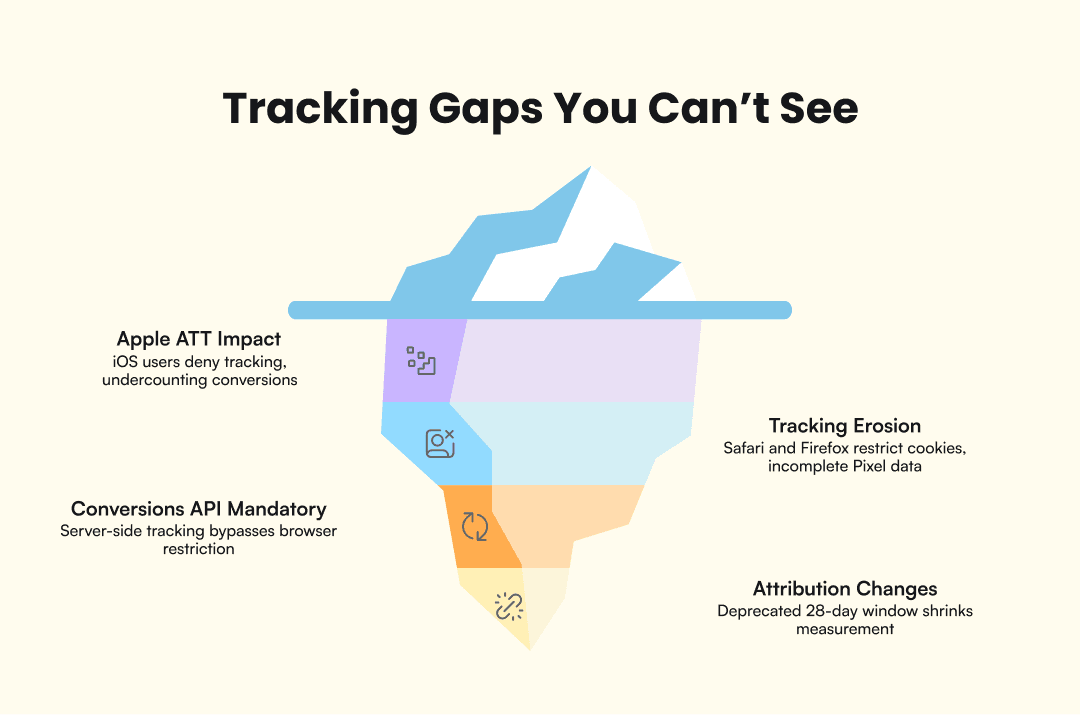
Before you kill a campaign, ask whether you have a conversion problem or a measurement problem. Many apparent performance drops are tracking gaps created by Apple’s ATT framework, browser restrictions, and attribution window changes. Your ads might still be driving sales that your dashboard can’t see.
Apple ATT impact. Roughly 65% of iOS users shown the App Tracking Transparency prompt deny tracking. That means your Meta Pixel only sees a fraction of actual iOS conversions. If iOS users make up 40–60% of your traffic (common for DTC brands), your reported conversion numbers could be undercounting by 25–40%. The gap between reported and real performance widens every quarter as more browsers and devices restrict third-party cookies.
Browser-side tracking erosion. Safari’s Intelligent Tracking Prevention (ITP) caps first-party cookies at 7 days. Firefox Enhanced Tracking Protection blocks known trackers by default. Ad blockers strip the Pixel from the page entirely. Combined, these hidden restrictions make your Pixel data incomplete in ways that aren’t visible in Ads Manager. You see fewer conversions and assume the ads stopped working, when the ads might be converting just fine beyond your Pixel’s line of sight.
Conversions API as mandatory infrastructure. Server-side tracking through Meta’s Conversions API (CAPI) sends conversion data directly from your server to Meta, bypassing browser restrictions entirely. This isn’t an optional upgrade. It’s the baseline for accurate measurement in 2026. Check your Event Match Quality score in Events Manager; anything below 6.0 means your data has meaningful gaps that affect both reporting accuracy and delivery optimization. In Events Manager, click your Pixel, go to Settings, and check whether “Conversions API” shows events flowing. If it shows zero server events, CAPI isn’t connected. If CAPI isn’t installed, your reported numbers are undercounting real conversions, and Meta’s algorithm is optimizing on incomplete data.
Attribution window changes. Meta deprecated the 28-day view attribution window, a change that caught many advertisers off guard. Campaigns that would have shown conversions under the old window now report zero, not because they stopped working, but because the measurement window shrank. If you’re comparing current performance to pre-deprecation benchmarks, you’re comparing different measurement systems, and the numbers will always look worse.
72-hour reporting delay. Meta’s statistical modeling means your dashboard lags reality by up to 3 days. Industry sources estimate that roughly 80% of ad clicks result in an actual page load, meaning about 1 in 5 users drop off before your landing page fires the Pixel. Making budget decisions based on today’s data is a recipe for cutting campaigns that are performing.
Why Your Ads Die Faster Now: Meta’s Andromeda System
Many of the symptoms above (creatives dying faster, performance dropping without warning, campaigns that worked for months suddenly stalling) trace back to a single systemic change most advertisers don’t know about. Meta’s Andromeda ad retrieval system was fully implemented across all ad accounts by October 2025. Andromeda represents a 10,000x increase in model complexity for ad retrieval, and it has changed the fundamental rules of how creatives perform on the platform.
Andromeda assigns Entity IDs to creative assets and clusters ads that look, sound, or feel similar together. Five “variations” of the same concept (different colors, slightly different text, same hook) get treated as one creative in the algorithm’s eyes. This kills the old playbook of making small tweaks to extend a winning ad’s lifespan. Under Andromeda, similar equals same. That ad you “refreshed” by swapping the background color or changing one line of copy? Andromeda already grouped it with the original.
The most visible effect: creative assets that lasted 6–8 weeks before Andromeda now fade in 2–3 weeks. This is why ads seem to “stop working” overnight. The platform burns through creative faster because it evaluates more ads simultaneously and identifies saturation sooner. Your creative didn’t get worse. The system got faster at recognizing when audiences have seen enough of it. And because Andromeda processes billions of ad candidates in real time, the competitive pressure on every individual creative is higher than it was a year ago.
Meta now recommends 8–15+ distinct creative concepts per campaign. “Distinct” means genuinely different angles, hooks, and formats, not color swaps or text overlays on the same footage. A talking-head testimonial, a product demo, a UGC-style unboxing, and a text-on-screen listicle count as four distinct concepts. The same person saying similar things in four outfits does not. If your creative pipeline can’t produce 8–15 diverse concepts every 2–3 weeks, you’ll keep experiencing ads that stop working. Advantage+ campaigns lean into this model by design, favoring broad targeting with high creative diversity. This is the structural root cause behind many of the symptoms covered earlier.
What to Do Next
Use the three-phase framework as a recurring diagnostic habit, not a one-time fix. When numbers drop, run through delivery, performance, and measurement in order before making changes. Most bad decisions come from skipping the diagnosis and jumping straight to “raise the budget” or “kill the campaign.”
Build prevention into your workflow:
Check ad frequency weekly at the ad level. Catch fatigue before CPA spikes.
Maintain a creative pipeline that produces fresh concepts on a schedule, not just when performance drops.
Treat CAPI as infrastructure, not an optimization. Install it once, monitor Event Match Quality monthly.
Give new campaigns 3–5 days and 50+ conversions before judging performance.
If none of the three phases resolve the issue, consider a hard reset: duplicate the campaign with fresh creative and broad targeting, let it re-enter learning with clean data, and compare results after a full week. Sometimes the fastest path forward is starting clean rather than diagnosing a campaign that has accumulated too many overlapping problems.
The biggest constraint for most advertisers in 2026 isn’t targeting or budget. It’s creative production speed. Andromeda’s appetite for distinct concepts means your pipeline needs to outpace the platform’s consumption rate. Tools like AdMove automate fresh creative production weekly, keeping your pipeline ahead of Andromeda’s burn rate.