Ad blockers, iOS opt-outs, Safari cookie limits, and browser privacy settings all cut into the same thing: the conversion data your Pixel sends back to Meta. Every blocked event is a purchase Meta never sees, which means worse attribution, wasted budget, and an algorithm that optimizes on a partial picture of your customers.
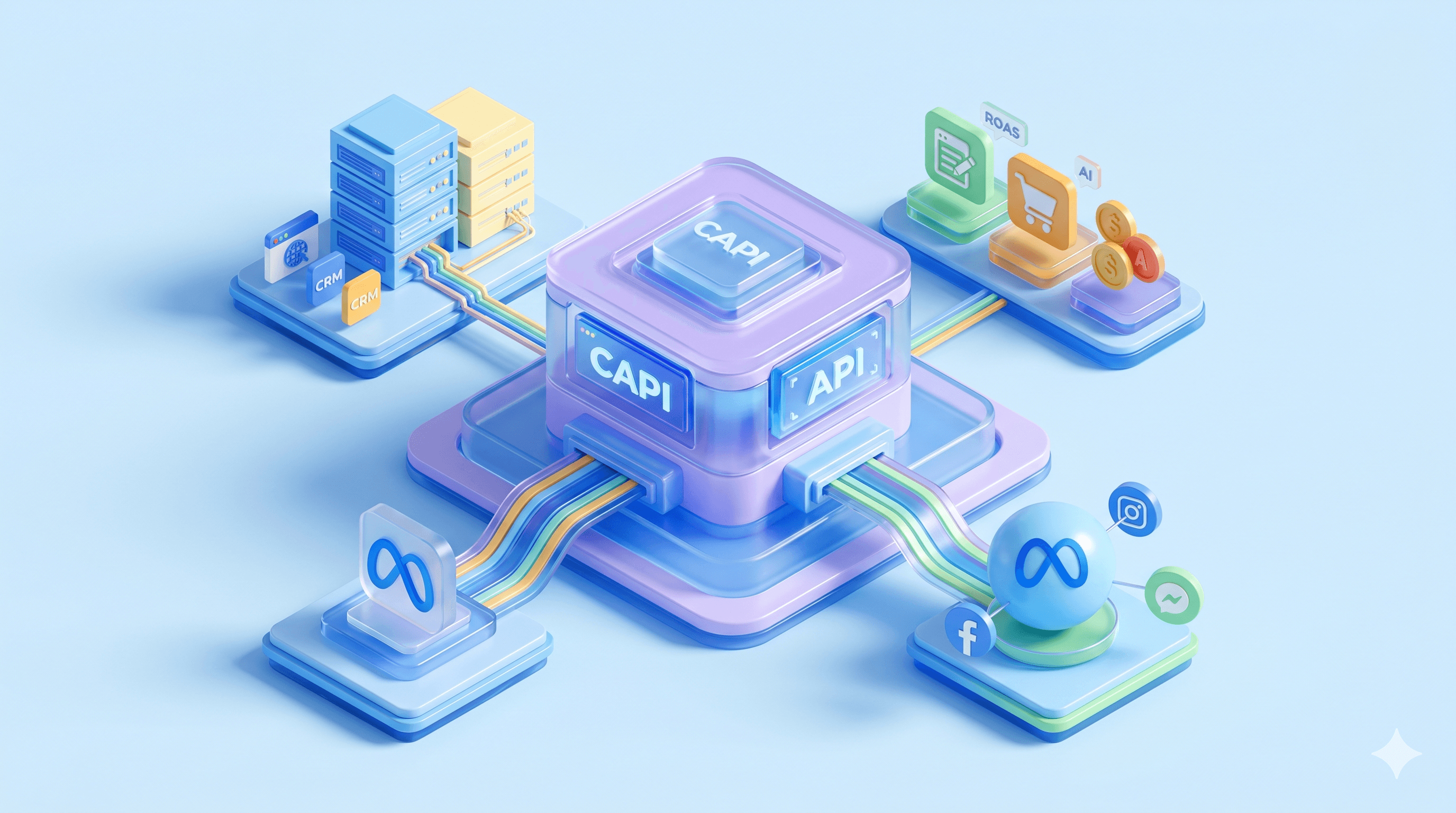
Meta CAPI (the Meta Conversions API) closes that gap by sending conversion data directly from your server to Meta’s servers, bypassing the browser entirely. Meta launched it in 2021. In 2026, the biggest adoption barrier disappeared: a free, one-click setup option inside Events Manager now handles configuration without any technical work. Industry surveys place CAPI usage between 35% and 60% of active Meta advertisers, which means a large share of accounts are still running on a degraded signal.
Key Takeaways
Meta CAPI (Meta Conversions API) is a server-to-server interface that sends conversion event data directly from your server to Meta, bypassing the browser entirely.
Browser-based tracking loses data from multiple directions at once: iOS ATT opt-outs, Safari ITP cookie restrictions, ad blockers, and Chrome privacy changes all compound the signal loss.
The Pixel depends on the visitor's browser cooperating. CAPI depends on your server. Meta recommends running both together so each catches conversions the other misses.
Meta's one-click CAPI setup, released in April 2026, removed the complexity barrier for standard web events but does not cover custom events, offline conversions, or multi-platform routing.
Five implementation methods exist, ranging from zero-configuration options to full custom API integration. The right choice depends on your platform, technical resources, budget, and how many ad platforms you track.
Event Match Quality (EMQ) is the 1-to-10 score that measures how well Meta can match your server-sent events to user profiles. A higher score means more of your conversion data reaches Meta's optimization systems.
Running Pixel and CAPI together requires event_id deduplication to prevent double-counted conversions, which would inflate reported results and distort automated bidding.
CAPI data quality directly affects Advantage+ campaign performance because Meta's machine learning uses conversion signals to decide who sees your ads.
What is Meta CAPI?
Meta CAPI (Meta Conversions API) is a server-to-server interface that sends conversion event data directly from your server to Meta. The Pixel runs as JavaScript in the visitor’s browser. CAPI doesn’t. It operates outside the browser entirely, so ad blockers, cookie restrictions, and privacy settings that degrade Pixel tracking have no effect on CAPI events.
Meta launched the API in 2021 as the Facebook Conversions API. Both names remain active: Meta Conversions API, Meta CAPI, and Facebook Conversions API all refer to the same system. Note that “CAPI” also appears in unrelated contexts (Kubernetes ClusterAPI, Computer-Assisted Personal Interviewing, California public assistance). Most search results for “CAPI” point to those other meanings, not Meta’s ad tracking tool. Add “Meta” to your searches to filter for the right one.
The practical difference: the Pixel depends on the visitor’s browser cooperating. CAPI depends on your server. When iOS restrictions, Safari ITP, or a browser extension blocks the Pixel, the conversion still reaches Meta through CAPI because the data path skips the browser entirely.
Why Meta CAPI matters: the signal loss problem
Your tracking is losing data from multiple directions, and each source of loss compounds the others:
iOS 14 / ATT: Most iPhone users opt out of cross-app tracking. The opt-out rate exceeded initial industry projections. For iOS-heavy audiences, the Pixel lost a large share of its attribution ability the day ATT rolled out.
Safari ITP: Blocks third-party cookies by default and caps first-party cookie lifetimes, reducing the Pixel’s ability to connect repeat visits to the same user.
Chrome third-party cookie deprecation: Google reversed its deprecation plan in 2024, replacing it with a user-choice prompt. The underlying Privacy Sandbox APIs still aim to reduce cross-site tracking, and the direction remains toward less cookie reliance even without outright removal.
Ad blockers: Between 25% and 30% of web users run ad-blocking software. Many block tracking scripts, including the Meta Pixel.
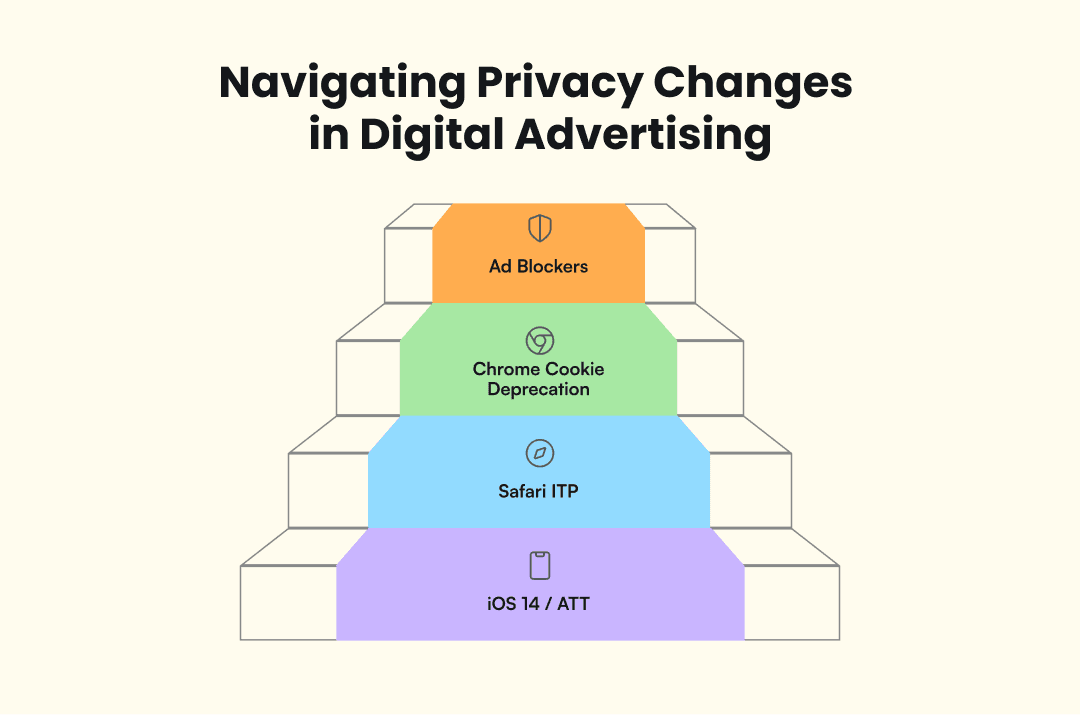
These forces stack. A visitor on Safari with an ad blocker and an iPhone is invisible to Pixel tracking three times over. Server-side tracking vendors reported in 2026 that Pixel-only setups miss 50%+ of actual conversions. GDPR and the Digital Markets Act add regulatory pressure on top of the technical forces.
The industry response has been consistent: first-party data, transmitted server-side, is the path that survives all of these restrictions. Multiple sources in 2026 now describe Meta CAPI not as recommended but as required infrastructure for accurate attribution.
How Meta CAPI works
A visitor takes an action on your site. Your server captures the event along with hashed customer identifiers, sends an API call to Meta’s servers, and Meta matches the event to a user profile for attribution. The identifiers that drive matching include email address, phone number, fbclid (Meta’s click ID), the fbp cookie (Meta’s first-party browser cookie), and external_id (your own customer identifier). More identifiers mean higher match probability. All personal data is SHA-256 hashed before transmission.
CAPI goes beyond web events. You can send app events, offline conversions (in-store purchases, phone orders, CRM events), and any server-side action you want Meta to use for optimization. The Pixel can’t match this because it only captures what happens in a browser window.
One thing CAPI doesn’t bypass: consent. Hashed or not, email addresses and phone numbers are personal data under GDPR, CCPA, and similar regulations. You still need a lawful basis (typically user consent) before sending that data to Meta. CMPs handle this on the Pixel side, but server-side events need their own consent check. If your CAPI implementation fires without verifying consent status first, you’re sending data you may not be authorized to send. Build that check into whatever triggers your server events, not just into your browser-side tags.
Meta recommends running Pixel and CAPI together. The Pixel catches client-side micro-interactions your server might miss; CAPI catches conversions the Pixel misses due to browser restrictions. Together they form a complete tracking picture, with event deduplication to prevent double-counting.
Meta CAPI vs Meta Pixel: key differences
The core trade-off is simplicity versus resilience. The Pixel is one JavaScript tag. CAPI requires a server-side connection. But every privacy restriction, ad blocker, and browser limitation erodes Pixel data while CAPI stays unaffected.
Dimension | Meta Pixel | Meta CAPI | Winner | Notes |
Data source | Browser (JavaScript) | Server (API call) | CAPI | Server path avoids browser-side failures |
Reliability | Affected by blockers, ITP, ATT | Resilient to browser restrictions | CAPI | Pixel degrades as privacy enforcement grows |
Privacy posture | Third-party cookies | First-party data, hashed server-side | CAPI | GDPR/CCPA-aligned by design |
Setup complexity | One JavaScript tag | Server integration (varies) | Pixel | One-click CAPI narrowed this gap in 2026 |
Best for | Basic tracking, micro-interactions | Full-funnel attribution, iOS-heavy audiences | Depends | Use both for complete coverage |
For small sites with low traffic, minimal iOS exposure, and low spend, the Pixel alone may still work. Once missing conversions distort your CPA reporting or Advantage+ optimization, CAPI becomes the fix.
The one-click CAPI setup in 2026
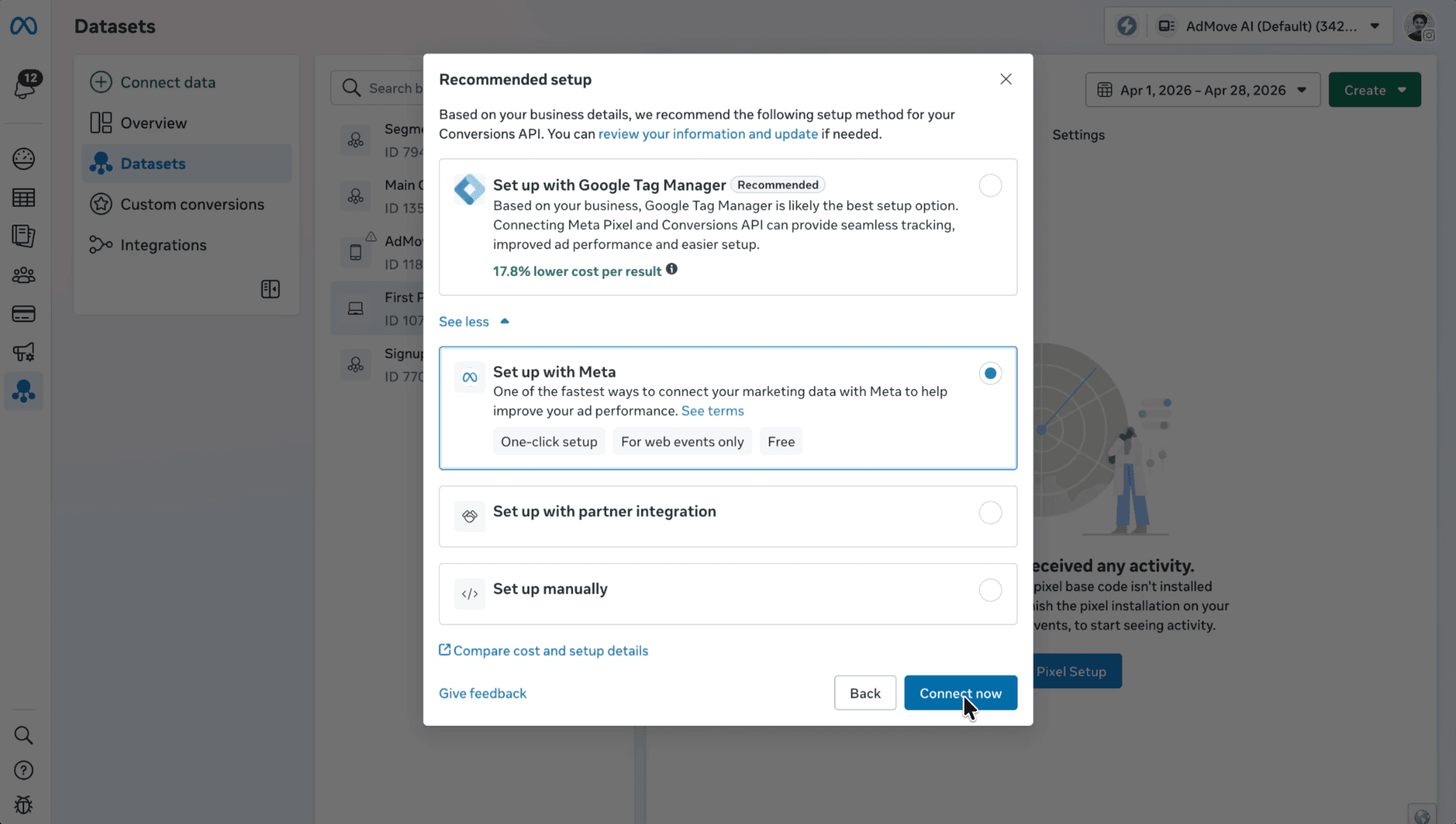
The primary objection to CAPI was always complexity: server infrastructure, developer time, ongoing maintenance. In April 2026, Meta released one-click CAPI, a zero-configuration option inside Events Manager. No cost, no server, no technical knowledge required. Advertisers using CAPI see 17.8% lower cost per result according to Meta’s own data, highlighted alongside the launch.
One-click covers standard web events: page views, add-to-carts, purchases, leads. Custom events, offline conversions, and multi-platform routing still require traditional methods. The advertisers who benefit most are SMBs, solo media buyers, and anyone who couldn’t justify hiring a developer. Shopify alone has more than two million merchants, many of whom had no realistic path to CAPI before this update.
The barrier dropped for basic implementation. Advanced setup still requires technical resources.
How to set up Meta CAPI: five implementation methods
Five paths exist, from zero-config to full custom. The right choice depends on your platform, technical resources, and how much control you need over what data reaches Meta. Here’s each method with its difficulty level, cost, and best-fit audience.
Partner integrations (Shopify, WooCommerce, WordPress)
Shopify has a native CAPI toggle in admin: connect your Meta account, turn it on, and Shopify handles server-side event transmission. WooCommerce and WordPress use plugins with a few more configuration steps. Shopify merchants using CAPI reported 15% more attributed conversions. The trade-off is limited customization: you send what the platform sends, and modifying event parameters usually requires development work outside the native integration.
One-click Meta-enabled CAPI (2026)
Available in Events Manager at no cost, with Meta handling the infrastructure. It covers standard web events only and is best suited for advertisers new to CAPI who have minimal technical resources.
CAPI Gateway (Meta CAPIG)
A cloud-hosted, no-code option sitting between your site and Meta’s servers. Available through Meta or third parties like Stape (~$10/pixel/month). More control than partner integrations: you can configure which events to send and apply basic data transformations without managing your own server. Best for mid-size advertisers who want flexibility without full infrastructure responsibility.
Server-side Google Tag Manager (sGTM)
The most flexible method. A server-side GTM container (hosted in Google Cloud or another provider) routes events to Meta, Google, TikTok, and other platforms from one setup. You configure Meta CAPI as one of several tags and manage all platforms from a single container. The trade-off is complexity: configuration, hosting costs (~$50–150/month), and multi-platform troubleshooting. Best for technical teams already using GTM who need multi-platform event routing.
Direct / manual API integration
Your dev team sends direct POST requests to Meta’s Conversions API, managing access tokens, constructing custom payloads, and controlling every parameter. Maximum flexibility, maximum development effort. You decide what data to send, when, and in what format, with full control over retry logic, error handling, and validation. Best for large advertisers with in-house development teams and complex data flows (offline conversions, CRM events, multi-step attribution) that don’t fit pre-built solutions.
Which CAPI setup method is right for you?
Four factors decide: your platform, technical capability, budget, and how many ad platforms you track across.
Your situation | Team | Budget | Complexity | Recommended method |
E-commerce on Shopify/Woo/WordPress | No dev team | Free | Low | Partner integration |
New to CAPI, no technical resources | Solo / small | Free | Lowest | One-click CAPI |
More control, no server management | Small to mid | ~$10/mo | Medium | CAPI Gateway |
Ads on Meta + Google + TikTok | Technical + GTM | ~$50–150/mo | High | Server-side GTM |
Complex flows, custom events, offline | In-house dev | Dev time + infra | Highest | Direct / manual API |
The methods aren’t mutually exclusive. You might run one-click CAPI for standard web events while using sGTM for custom events or offline imports. Your implementation can grow as your tracking needs become more specific.
Event Match Quality: the metric that makes CAPI actually work
Getting CAPI running is step one. Event Match Quality (EMQ) is the metric that tells you whether it’s working well. EMQ is a 1–10 score in Events Manager measuring how well Meta can match your server events to user profiles. A score of 6.0 means Meta matched roughly 60% of the events you sent; a score of 9.0 means about 90% matched. What drives the score is the number and quality of customer identifiers you include with each event. Pixel-only setups typically score 3.5–5.0. Enriched CAPI implementations reach 7.5–9.0.
To improve your EMQ:
Send as many valid customer identifiers as possible with each event (email, phone, fbclid, fbp, external_id).
Confirm all personal data is SHA-256 hashed before transmission.
Enable Advanced Matching in Events Manager.
Monitor your score regularly. Below 6.0 means Meta is losing a significant share of your events.
Higher match rates feed more accurate data into Advantage+ optimization, which directly reduces cost per acquisition. CAPI without EMQ optimization leaves performance on the table.
Event deduplication: running Pixel and CAPI together without double-counting
Running both means the same conversion can be reported twice. Without deduplication, conversion counts inflate, CPA reporting breaks, and automated bidding optimizes against wrong data.
The fix is event_id matching: both Pixel and CAPI send an identical event_id for the same conversion. When Meta receives two events with the same event_id and the same event name (Purchase, Lead, AddToCart), it counts the conversion once and discards the duplicate. If the event names differ, Meta treats them as separate events regardless of matching IDs. Common mistakes that break this:
Generating different event_id values in browser and server code.
Timezone discrepancies causing events to appear hours apart.
Delayed server events arriving outside Meta’s roughly two-hour deduplication window.
When deduplication fails, you’ll see inflated conversions, artificially low CPA numbers, and Advantage+ campaigns that overbid because they think results are better than reality.
How CAPI feeds Meta’s AI: the Advantage+ connection
CAPI also feeds the machine learning behind ad delivery. Advantage+ Shopping Campaigns and Andromeda (Meta's creative ranking system) both use conversion data to decide which users see which ads. If the Pixel missed half your conversions, those systems are making delivery decisions based on half the picture, and your budget follows their blind spots.
This became more pressing in Q1 2026 when Meta mandated the migration of legacy campaigns into Advantage+. If your campaigns run on Advantage+ (most now do), CAPI data quality directly affects how well Meta’s AI allocates your spend. The conversion data you send is the raw material Advantage+ uses to decide where your budget goes.
Meta CAPI performance: what the numbers show
The performance gains are well-documented:
17.8% lower cost per result
13% average CPA reduction
10–40% more reported conversions after implementation
Two-thirds of advertisers report improved ROAS
These purchases were already happening. CAPI makes them visible to Meta, so your retargeting pools grow, your custom audiences reflect actual buyers instead of a partial sample, and your lookalikes seed from a more complete customer profile. Better data lowers your cost per result because Meta's algorithm bids on signals that actually match your buyers.
Beyond Meta: cross-platform server-side tracking
Every major ad platform now offers a server-side conversions API, making this an industry shift rather than a Meta-specific requirement:
Google Enhanced Conversions: single-toggle setup launching June 2026.
TikTok Events API: similar server-to-server model.
Snapchat, Pinterest, LinkedIn: each maintain their own Conversions APIs.
For multi-platform advertisers, the infrastructure investment pays off well beyond Meta. A server-side GTM container configured for Meta CAPI can route events to Google, TikTok, and other platforms from one setup. The concept of a Signals Gateway, a single server-side endpoint feeding multiple ad networks simultaneously, is the logical next step for advertisers who need cross-platform tracking without building separate integrations for each network.
Conclusion
Meta CAPI is an infrastructure that determines how well Advantage+ and Andromeda can optimize your spend. In 2026, the question is which method fits your situation and how aggressively to refine the data you send.
If you’re on Shopify, the native integration takes minutes. No technical resources at all? One-click CAPI is the starting point. Already running CAPI? Your next priority is EMQ: check your score in Events Manager and work toward 7.0+ by sending more customer identifiers per event.
As Advantage+ handles more of the buying process and Andromeda makes more delivery decisions, the conversion data you feed Meta’s AI becomes the highest-leverage variable under your control. Server-side tracking is the foundation. Start with the method that fits now and push your Event Match Quality above 7.0. Everything else builds from there.