
On April 29, 2026, Meta shipped something that changes how paid social advertisers interact with the Marketing API. Meta Ads AI Connectors is the umbrella product: two interfaces, one MCP Server and one CLI, that wrap the full Marketing API behind a single OAuth prompt. No Developer App, no App Review, and no multi-day approval wait. You authenticate through your browser, and you’re connected.
Creating a Meta Developer App, navigating App Review, and configuring permissions manually took 25 minutes or more, and the approval process could stretch across days. The new path takes 5 to 15 minutes from start to first query, according to practitioner estimates. For media buyers pulling morning performance reports, agency owners managing cross-client operations, and DTC brand operators syncing product catalogs, that friction reduction is the difference between using the API and never bothering.
This guide covers both interfaces in practical terms: what they do, how they differ, how to set each one up, and where they fall short.
Key Takeaways
Meta Ads AI Connectors is Meta's umbrella name for two interfaces to the Marketing API: an MCP Server (hosted at mcp.facebook.com/ads for conversational use) and a CLI (installed via npm for scripted workflows). Both launched April 29, 2026.
Both interfaces authenticate through Meta Business OAuth rather than the traditional Developer App and App Review process, cutting setup time from days to minutes.
The MCP Server and CLI expose the same 29 tools across five capability areas: reporting and insights, campaign management, catalog operations, account diagnostics, and dataset operations.
Every campaign, ad set, and ad created through the connectors lands in PAUSED status. No CLI flag overrides this default.
The recommended operating split is MCP for analysis and ad-hoc reporting, CLI for deterministic execution and bulk operations.
Catalog operations account for 10 of the 29 tools, making product feed management the heaviest capability cluster in the toolkit.
MCP sessions preload tool descriptions into the AI client's context window, adding token overhead that grows when multiple connectors run alongside Meta's. The CLI avoids this cost entirely.
The connectors cannot access Meta's optimization layer (Advantage+, bidding algorithms, audience expansion), lead form management, or local files from the MCP Server.
Meta is the first major ad platform to ship full read-and-write MCP access from day one. Google Ads MCP still requires a Developer App, and Amazon Ads reached open beta earlier in 2026.
What did Meta ship?
Meta Ads AI Connectors is Meta’s name for two distinct interfaces to the Marketing API, both released on April 29, 2026, and both authenticated through Meta Business OAuth rather than the traditional Developer App flow.
The first interface is the Meta Ads MCP Server, a hosted endpoint at mcp.facebook.com/ads that follows the Model Context Protocol (MCP) standard. MCP is an open protocol that lets AI assistants connect to external data sources and tools through a standardized interface. You connect to Meta’s MCP Server through any compatible client: Claude Desktop, ChatGPT, or others that support the protocol. The interaction is conversational. You ask questions about your ad accounts in natural language, and the server handles the API calls behind the scenes.
The second interface is the Meta Ads CLI, a command-line tool installed via npm and authenticated through meta auth login. It requires Python 3.12+ and runs through terminal-based clients like Claude Code. The CLI is deterministic: it produces spec files and exit codes rather than conversational responses, and it’s designed for scripted, repeatable workflows.
Both interfaces expose the same underlying capabilities: 29 tools across five capability areas, independently confirmed by audits from MCP. Directory and Pasquale Pillitteri. Both enforce a critical safety mechanism. Every campaign, ad set, and ad created through the connectors lands in PAUSED status. No CLI flag overrides this. You must manually activate anything the connectors create.
The connectors are free during the current open beta. Meta has not announced long-term pricing as of May 2026.
Where Meta fits in the MCP ecosystem
Meta’s connectors arrived into an ad-platform MCP timeline that started almost a year earlier. Google Analytics launched its MCP integration in July 2025. Google Ads followed in October 2025, though initially with read-only access and a requirement for a Developer App and token. Amazon Ads entered closed beta in November 2025 and opened its beta in February 2026. Meta’s April 2026 launch is the latest entry, but it’s the first major ad platform to ship full read-and-write access from day one.
For multi-platform advertisers, this difference matters. Google Ads MCP still requires a Developer App for authentication, adding setup friction that Meta’s OAuth flow eliminates. The IAB Tech Lab Agent Registry listed 10 active MCP entries as of March 2026, a sign that the protocol is moving toward industry-wide adoption. For advertisers managing spend across Google, Amazon, and Meta, the convergence points toward a future where campaign management across all three platforms runs through a unified MCP layer.
MCP or CLI: which one do you need?
Use MCP for conversational analysis and ad-hoc reporting. Use CLI for deterministic, scriptable execution and bulk operations. That framework is the emerging consensus among early adopters, and it holds up well in practice.
The two interfaces sit on opposite ends of a spectrum. MCP is built for exploration: you talk to your ad data through a chat interface, ask follow-up questions, and get performance summaries in natural language. CLI is built for repeatability. You run commands that produce consistent outputs, generate spec files you can review before acting, and chain operations into automated workflows.
One practical cost to consider: MCP sessions preload tool descriptions into the AI client’s context window. Meta’s 29-tool connector uses fewer tokens than a usual MCP, but the overhead grows when additional connectors are loaded alongside it. The CLI avoids that overhead because it doesn’t preload tool definitions every turn, making it more token-efficient for operators running multiple sessions daily.
Interface | How you interact | Best for | Auth | Output | Token cost | Ideal use case |
MCP Server | Chat / natural language | Analysis, reporting, ad-hoc queries | OAuth via browser | Conversational responses | ~55K tokens per session | Morning performance review across accounts |
CLI | Terminal commands | Bulk edits, scripted workflows, automation | OAuth via meta auth login | Spec files, exit codes | Low (no preloaded definitions) | Batch budget changes across 20 campaigns |
Most advertisers will use both at different points. The MCP Server handles the thinking: pull overnight numbers, flag anomalies, and compare performance across ad sets. The CLI handles the doing. Apply budget changes, pause underperformers, and launch new catalog-based campaigns. The combination works because each interface plays to its strengths without duplicating the other.
A concrete example of the split in action: you open an MCP session at 8 AM and ask for a performance summary across your five active campaigns. The MCP Server surfaces that two campaigns have CPAs 35 percent above their weekly average. You follow up with questions to identify the ad sets responsible. Then you switch to the CLI, run a batch command that reduces daily budgets on those ad sets by 20 percent, and the changes land in PAUSED for your review. Analysis in MCP, execution in CLI.
What can the connectors do? The 29-tool catalog
Both the MCP Server and CLI expose the same 29 tools, grouped across five capability areas. The tools are the same regardless of which interface you use; the difference is how you interact with them. Here’s what they cover, organized by what advertisers do with them.
Reporting and insights (7 tools)
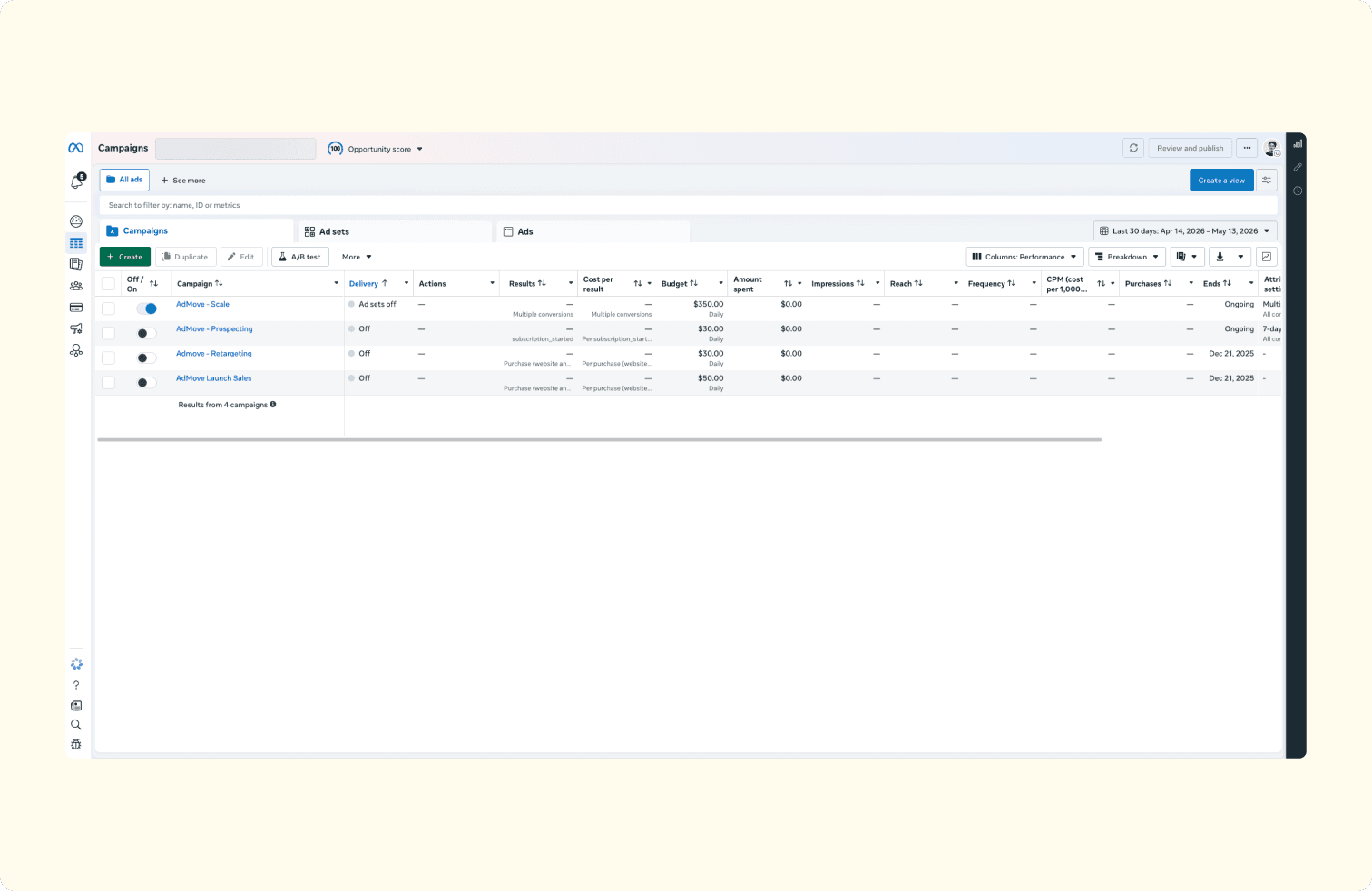
Seven tools handle the read side of the connectors, and they’re where most advertisers will start because they carry zero risk.
Performance data retrieval. Pull campaign-level, ad-set-level, and ad-level metrics across any date range. Replaces the manual Ads Manager export-and-pivot routine that eats the first hour of most media buyers’ mornings.
Cross-account summaries. Generate performance reports across multiple ad accounts in a single query. For agencies managing ten or more client accounts, this replaces what used to require either a custom reporting tool or a $500/month third-party platform, according to practitioner estimates from Common Thread Collective.
Anomaly surfacing. Flag CPM spikes, budget pacing issues, and delivery anomalies. CPMs can jump 30 to 40 percent during high-competition periods, and catching those spikes early is the difference between adjusting spend and burning budget overnight.
The reporting tools represent the lowest-risk entry point into the connectors. They read data without modifying anything, which makes them ideal for a first session. Most advertisers who try the connectors start here, and many find that the reporting capabilities alone justify the setup time.
Campaign management (5 tools)
Five tools cover the write side of campaign operations: budget editing, campaign pausing, lookalike audience creation, and status changes. Every entity created through these tools lands in PAUSED status, so there’s no risk of accidental live launches. The PAUSED default means you can build and stage campaigns through the connectors, then review and activate manually in Ads Manager.
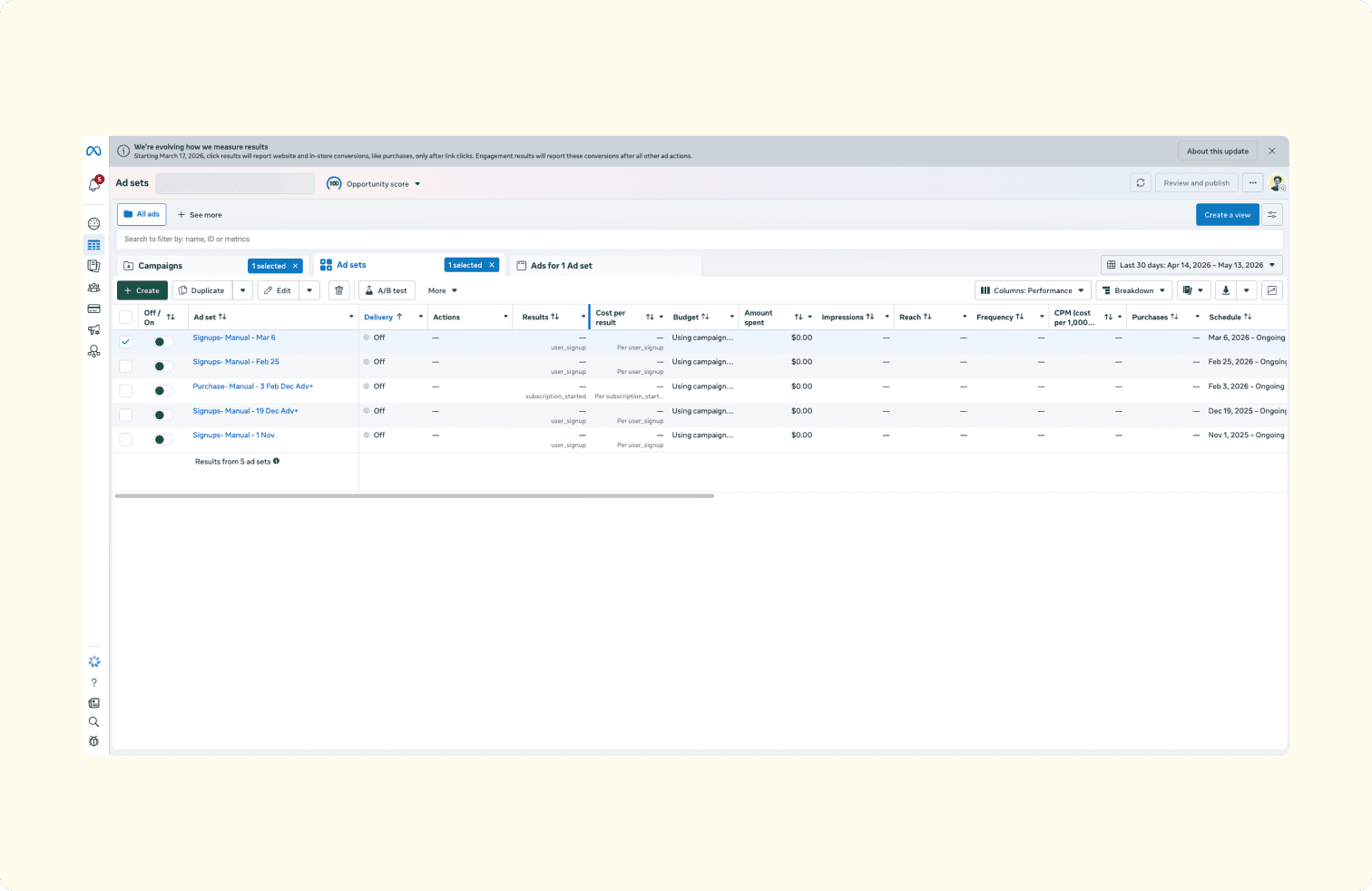
The PAUSED-by-default behavior is worth reiterating because it’s the single most important safety mechanism in the system. Unlike some third-party automation tools that offer optional guardrails, the official connectors enforce this at the protocol level. If you create an ad set with a $500 daily budget through the CLI, that ad set sits paused until you deliberately activate it.
Catalog operations (10 tools)
The heaviest cluster in the toolkit. Ten of the 29 tools focus on product catalog management. These handle product feed updates, catalog item creation and editing, and inventory synchronization. For e-commerce operators managing large product catalogs (hundreds or thousands of SKUs), these tools overlap most directly with existing feed management platforms. The value is in consolidation: catalog updates, campaign adjustments, and performance monitoring are all accessible through the same interface rather than spread across three or four separate tools.
The practical benefit of having catalog operations alongside campaign management in the same toolkit is the ability to catch and fix mismatches. A product goes out of stock, but its ad set is still running. A price changes in your store, but the catalog feed hasn’t synced. These are the small operational gaps that waste spend silently, and the connectors surface them within the same session where you’re already reviewing performance.
Signal diagnostics (3 account + 4 dataset tools)
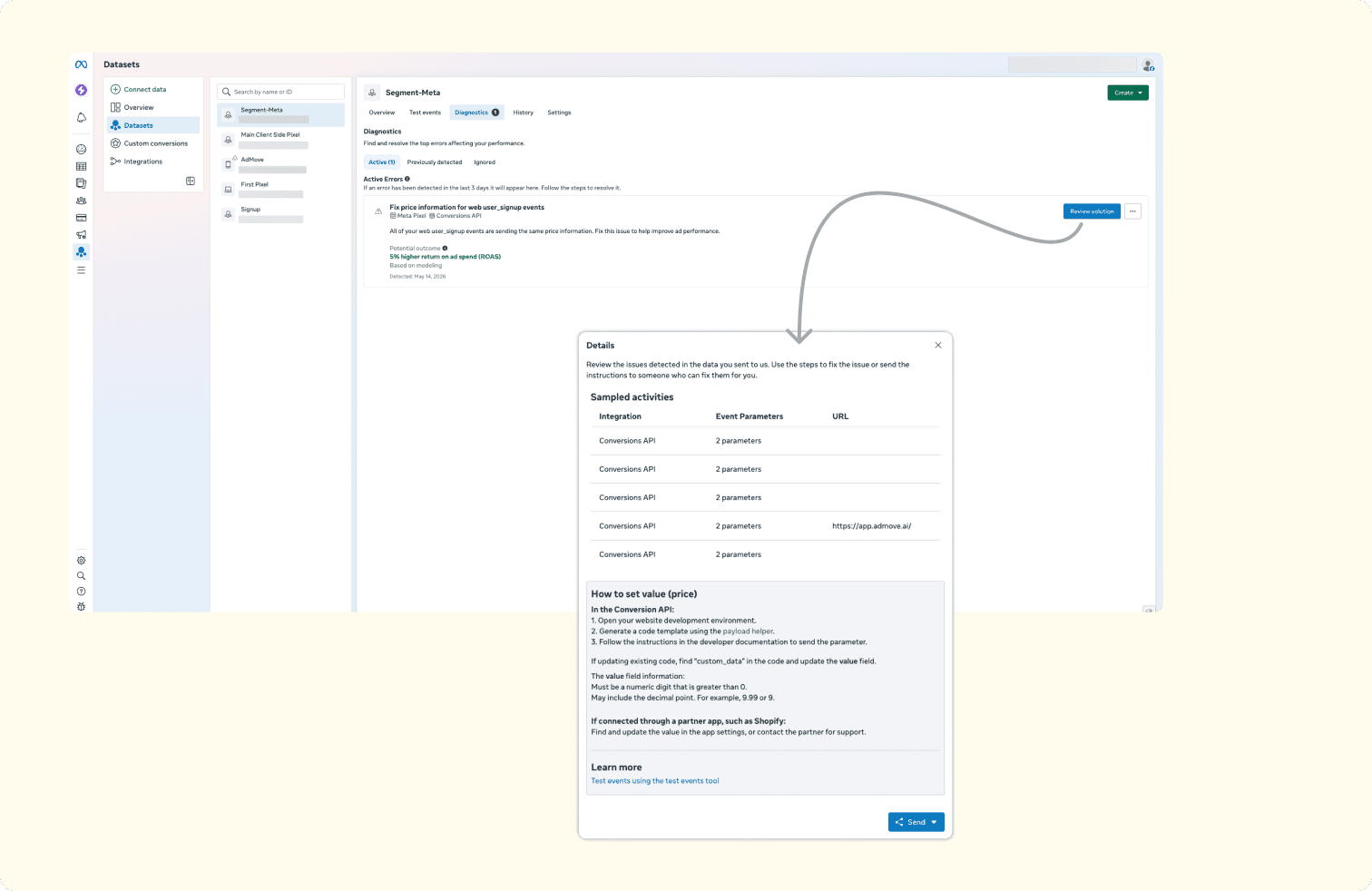
Seven tools handle signal health monitoring: three for account-level diagnostics and four for dataset operations. In practice, these tools let you check whether your Meta Pixel is firing correctly, audit your Conversions API (CAPI) event coverage, and monitor the quality of the conversion signals feeding Meta’s delivery algorithm.
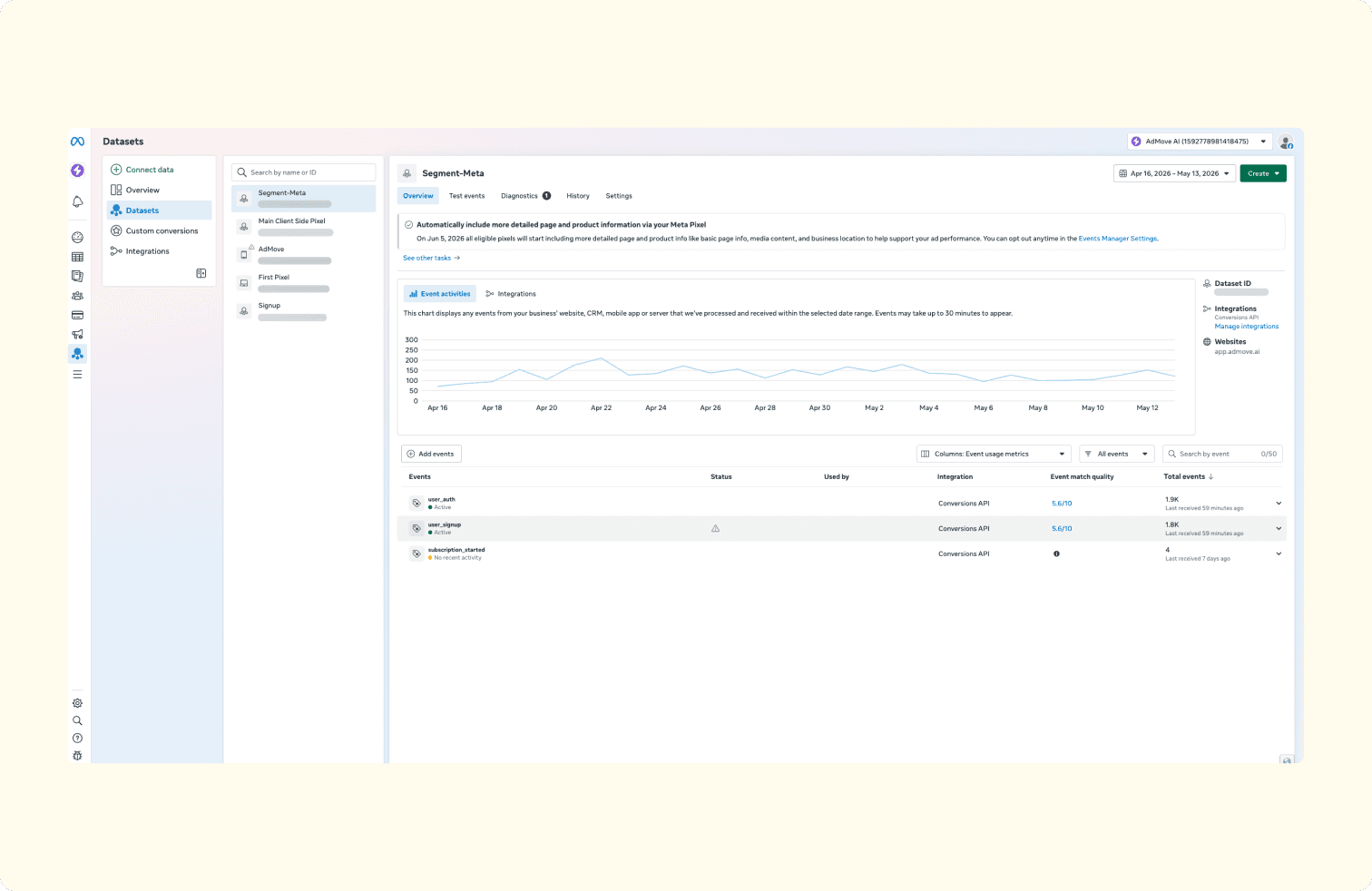
Post-iOS-14 signal quality remains one of the most persistent pain points in paid social. Before these connectors, diagnosing Pixel and CAPI issues required either manual debugging through the Pixel Helper browser extension or hiring a specialist.
How to get started
Both paths start with the same prerequisite: a Meta Business account with OAuth access to the ad accounts you want to manage. From there, the setup diverges depending on which interface you choose.
Setting up the MCP Server (5 to 7 minutes)
The MCP path is the faster of the two. You’ll need an MCP-compatible client installed on your machine. Claude Desktop and ChatGPT both support MCP connections.
Open your MCP client and navigate to the server configuration settings.
Add a new MCP server using the endpoint mcp.facebook.com/ads.
Your browser will open a Meta Business OAuth prompt. Authorize the connection by selecting which ad accounts and permissions to grant.
On first connection, the client loads all 29 tool descriptions into its context. The token overhead varies depending on what other connectors are active alongside Meta’s.
Once connected, you can start asking questions about your ad accounts in natural language: “What’s the CPM trend across my active campaigns this week?”
Setup time runs around 5 to 7 minutes in practitioner estimates, mostly spent on the OAuth authorization step.
Installing the CLI (10 to 15 minutes)
The CLI path takes longer because it involves a local installation.
Install the Meta Ads CLI package via npm.
Run meta auth login in your terminal. This opens the same browser-based OAuth prompt as the MCP path.
Confirm your machine has Python 3.12 or higher installed; the CLI depends on it.
Claude Code is the primary client for CLI-based workflows, though any terminal environment works.
Run your first command to verify the connection: pull an account performance summary for the current week.
The extra time (10 to 15 minutes in practitioner estimates) comes from the npm installation and Python version verification steps. Once installed, subsequent sessions start instantly.
The old way vs the new way
Before the connectors, accessing the Marketing API programmatically meant creating a Meta Developer App, submitting it for App Review, waiting days for approval, and manually configuring permissions for each ad account. The process took 25 minutes or more of active setup, and the approval wait could stretch the total timeline to days or even weeks.
The new path collapses that entire process into an OAuth prompt. Click authorize, select your accounts, and you’re connected. No Developer App to create, no App Review to pass, and no permissions to configure manually. The total time from “I want API access” to “I’m pulling data” dropped from days to minutes.
For agencies onboarding new clients, this is particularly significant. The old flow meant that adding a new client’s ad accounts required re-running the Developer App configuration or extending existing permissions through App Review. The new flow means onboarding a new client’s accounts takes the same 5 to 7 minutes as the first connection: authorize via OAuth, grant access to the relevant accounts, and start working.
Practical workflows by role
The connectors fit into each role's daily routine in a different way. Here's how the three core advertising roles put them to work.
For media buyers: the morning performance check
You open Claude Desktop at 8 AM and run one query against all your active accounts. Within seconds you see which campaigns paced ahead of budget, which ad sets saw CPM spikes, and which ads crossed your CPA threshold. The same read in Ads Manager means opening each account separately, exporting CSVs, and building the summary yourself.
When something looks off, the flow is:
Spot the problem in MCP (say, a retargeting campaign burned through 40 percent of its weekly budget overnight).
Switch to the CLI and run a batch command that adjusts daily budgets on that campaign and three others showing the same pattern.
Review the changes (everything lands in PAUSED status) and activate the ones you approve.
Total time drops from roughly 45 minutes to 15. The change is about staying in one environment instead of toggling between Ads Manager tabs, spreadsheet exports, and Slack threads.
For agency owners: the client reporting stack
Your weekly client reporting used to involve pulling data from each account separately, assembling it into a template, and reviewing it before sending. With the MCP Server, you generate cross-account performance summaries in a single session. The connectors pull metrics across all client accounts you have OAuth access to, and you can ask follow-up questions (“Which client’s CPA increased the most week over week?”) without leaving the chat.
Beyond reporting, the connectors shift the agency's operational model. The Pixel and CAPI diagnostic tools let you audit signal health across client accounts proactively, surfacing issues before they degrade campaign performance. Batch creative test launches via CLI let junior team members execute at scale without deep Ads Manager expertise.
For DTC brand operators: catalog and signal automation
If you run an e-commerce brand with a product catalog of any size, the catalog operations tools are where the connectors pay for themselves fastest. You can sync product feeds, run catalog diagnostics to find broken listings or out-of-stock items still appearing in ads, and update catalog data without switching to a separate feed management platform.
The signal diagnostic tools are equally valuable. You check whether your Pixel is firing on all key events, confirm that your CAPI integration is sending matching event data, and catch signal gaps before they affect delivery. Cleaner signals and a well-maintained catalog are the operational foundation that makes Advantage+ Shopping Campaigns perform better.
What the connectors can’t do yet
The connectors are a beta product with real constraints. Knowing where they stop is as important as knowing what they do.
Beta capability gaps
Several features of the Marketing API aren’t yet exposed through the connectors. Audience Network reservation buys, branded content tools, and some lift studies remain inaccessible as of May 2026. These are beta-stage omissions rather than architectural limits. Meta may close them as the connector surface expands.
Structural limitations
The connectors automate workflow. Campaign optimization stays under Meta's control. Three gaps worth knowing:
No optimization access. The connectors cannot touch Meta's Advantage+ layer, bidding algorithms, or audience expansion logic. They can create a campaign and set its budget, but they cannot influence how Meta delivers it.
No lead form management. Lead retrieval, form editing, and CRM synchronization remain manual or dependent on third-party integrations like LeadSync. If you run lead gen campaigns, the post-submission workflow hasn't changed.
No local file access (MCP only). The MCP Server requires public URLs for creative assets and cannot reference files stored on your machine. You'll need to host images or videos somewhere accessible before uploading them.
Practical cost: the token tax
MCP sessions consume input tokens on tool descriptions before the model writes a single word back. Community benchmarks put the overhead at roughly 55,000 tokens for a 58-tool profile; Meta's 29 tools use less on their own, but the cost adds up when other connectors are loaded alongside it across multiple sessions and accounts daily. For individual users, the overhead is modest at current API pricing, but it scales with session frequency. The CLI skips this cost entirely, which is one reason the "MCP for analysis, CLI for execution" split makes economic sense on top of functional sense.
Compliance risks that remain
The official connectors reduce one major compliance risk (unauthorized API access), but three ban vectors persist. Content policy violations from AI-generated ad creative can still trigger account suspensions. Aggressive automation that hits Meta’s rate limits can flag accounts for review. And unauthorized scope escalation, where an AI agent attempts actions beyond its granted permissions, remains a risk regardless of the access path.
Early experimenters learned this the hard way. Before the official connectors launched, at least one advertiser using a third-party MCP had their ad account permanently banned. Digiday separately reported on the broader pattern of account restrictions linked to unofficial AI tool integrations. David Parrottino, a Meta employee, has since directed advertisers to the official connectors as the compliance-safe route. The official path removes the "unauthorized access" risk, but it doesn't eliminate the need for human review of what the connectors produce
What to do next
The operating split is straightforward: MCP for analysis, CLI for execution. Start with whichever side matches your most immediate need.
Media buyers should connect the MCP Server through Claude Desktop or ChatGPT and run a morning performance check across your accounts. That single use case replaces the most time-consuming part of most buyers’ daily routine, and it requires nothing beyond the OAuth connection.
Agency owners can start with MCP for cross-client reporting and pilot the CLI for batch operations. The connectors are most valuable at scale, and agency workflows are where that scale already exists.
DTC brand operators should connect through MCP and run a catalog diagnostic followed by a signal health check. Those two workflows address the most common operational gaps that silently degrade Advantage+ Shopping Campaign performance.
Three things to watch going forward: Meta’s pricing announcement for post-beta access, the closure of beta capability gaps (lead forms, branded content tools, lift studies), and broader MCP adoption across platforms. Amazon Ads MCP moved to open beta in February 2026. Google Ads MCP continues to evolve. The unified multi-platform management layer that these protocols enable is getting closer to reality.